The Copilot Studio Auth Trap: Turning On SSO Changes Your Client
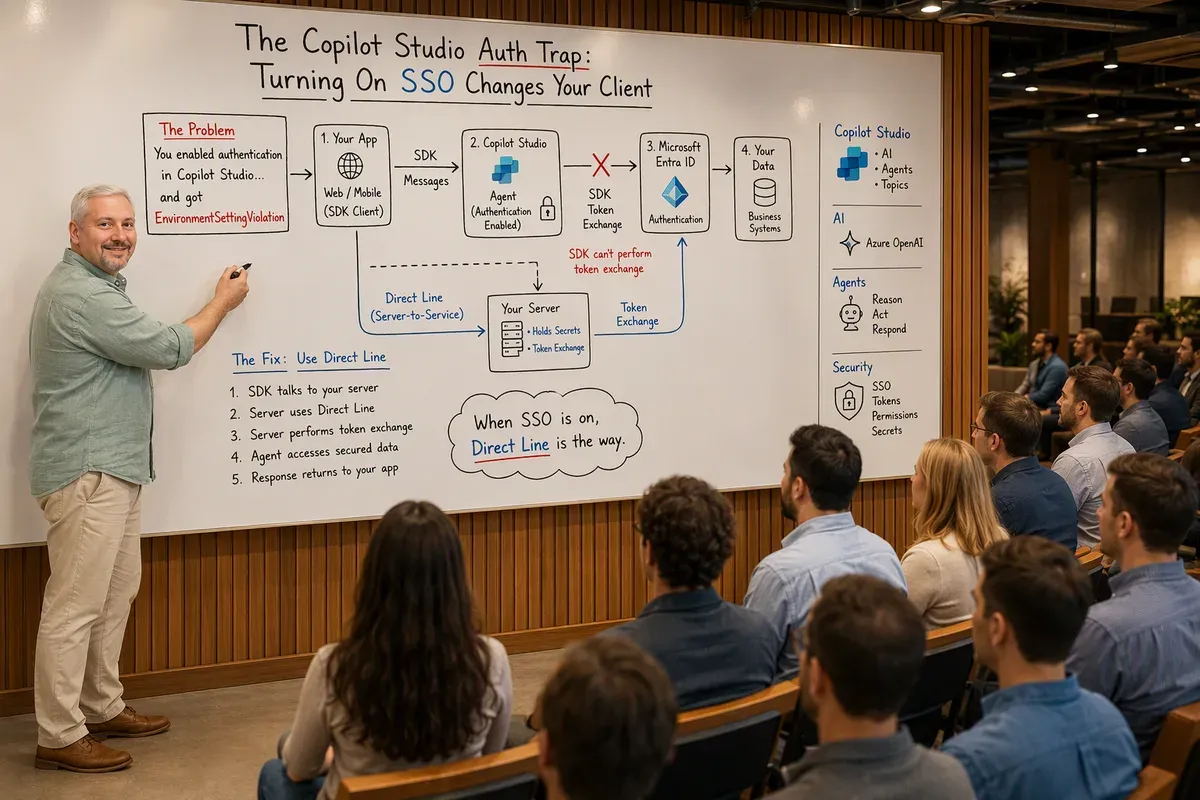
While building Portal 360°, a single-pane-of-glass admin portal, I embedded
a Copilot Studio agent as a second in-app assistant. The first version used the
official SDK, @microsoft/agents-copilotstudio-client, and in a quick demo it
answered questions fine. Then I turned on authentication so the agent could act
as the signed-in admin, and the chat window returned:
Sorry, something unexpected happened. We're looking into it.
Error code: EnvironmentSettingViolation
Nothing about my code had changed. I’d only flipped a setting on the agent. That’s when the same lesson I’d learned wiring up Intune showed up in a completely different costume:
The permission model is only half the story. Enabling SSO on a Copilot Studio agent doesn’t just change whether the user signs in. It changes what your client has to be capable of. The scope you turned on implied a protocol your client didn’t speak.
Why?What is EnvironmentSettingViolation really telling you?
It means the agent now expects the token exchange handshake
(signin/tokenExchange invoke activities) that SSO/authenticated bots use to
swap a user’s identity for a bot-scoped token. Your client sent a plain access
token and never answered the OAuth card, so from the agent’s point of view the
environment’s auth setting was violated. The error is about a missing
capability, not a bad credential.
The SDK vs Direct Line decision is an auth decision
Here’s the part the quick-start doesn’t emphasize: the SDK doesn’t do token exchange. It’s built for headless and “No authentication” scenarios, meaning server-to-server automation and custom native apps that own their own auth flow. The moment your agent has any auth mode other than “No authentication,” the SDK is the wrong tool:
// This works in a demo, and breaks the instant the agent has SSO enabled.
const client = new CopilotStudioClient(settings, accessToken)
// The SDK can't intercept the OAuth card or send signin/tokenExchange.
The fix isn’t a different token. It’s a different transport. Direct Line (the standard Bot Framework channel) supports the full token-exchange pattern that SSO-enabled agents require.
| Use Direct Line when… | Use the SDK when… |
|---|---|
| The agent has SSO / any authentication enabled | The agent uses “No authentication” |
| You’re in a browser and need OAuth cards to work | You’re doing headless server-to-server calls |
| You want token exchange for a seamless sign-in | You own a bespoke native auth flow |
| It’s a production web app with enterprise identity | It’s automation with no user identity |
Why?Why did the demo work before I enabled auth?
With “No authentication,” there’s no OAuth card and no token exchange, so the SDK just relays messages and it looks perfect. Auth is the feature that exposes the capability gap. This is exactly why a demo passing tells you very little about whether the integration is production-ready.
The pattern I landed on: Direct Line behind my own server route
Switching to Direct Line also fixed a second problem I’d been fighting. I’d been calling SDK methods that didn’t behave as I expected. Moving to the Direct Line REST flow made the integration boringly predictable, and it let me keep every secret server-side. The architecture became:
[Browser] → [/api/copilot-studio/chat] → [Direct Line API] → [Copilot Studio agent]My server route does the whole dance and the browser never sees a token:
- Request a Direct Line token from the agent’s endpoint.
- Start a conversation.
- Send the user’s message.
- Poll for the agent’s reply.
- Return a typed JSON payload to the frontend.
// src/app/api/copilot-studio/chat/route.ts (shape, not secrets)
const BOT_ID = process.env.COPILOT_STUDIO_BOT_ID          // e.g. cr7d6_serviceDesk
const TENANT_ID = process.env.COPILOT_STUDIO_TENANT_ID    // <tenant-guid>
const ENVIRONMENT_ID = process.env.COPILOT_STUDIO_ENVIRONMENT_ID // <environment-guid>
// Direct Line secret is read server-side and NEVER shipped to the browser.Why?Why route it through your own server (BFF)?
This is the Backend-for-Frontend pattern. The Direct Line secret and any user token stay on the server; the client just posts a message and renders the reply. That keeps conversation state server-side, makes the frontend stateless, and means a leaked bundle can never expose a channel secret. It’s the same discipline that keeps Graph tokens out of the browser: one rule, applied to every external call.
A note on secrets: the environment variables above are placeholders. Never commit real bot, tenant, or environment IDs, let alone a Direct Line secret, to source control or ship them to the client. Keep them in server-side configuration.
While you’re in the Dataverse: usage is just transcripts
One bonus lesson from the same feature. If you want per-agent usage metrics, you don’t need a special analytics API. Copilot Studio writes it all to Dataverse. Two tables do the job:
bots: agent metadata. Watchruntimeprovider:0is a classic Power Virtual Agents bot,1is a generative-AI agent. That one field tells you which generation you’re looking at.conversationtranscripts: one row per conversation, each carrying the raw Bot Framework activity JSON. Join on the bot’s ID, bucket bycreatedon, and you’ve got volume, trends, and a per-agent sparkline without any new endpoint.
It’s a good reminder that “how do I measure this?” often has a boring, already-in-Dataverse answer.
The through-line
Whether it’s Intune returning a 403 because a Graph scope wasn’t backed by an
RBAC role, or a Copilot Studio agent throwing EnvironmentSettingViolation
because SSO demanded a protocol my client couldn’t speak, it’s the same trap:
the setting you toggled implied requirements you didn’t see. Design for the
gap: pick the client that matches the auth mode, keep secrets server-side, and
make the failure modes observable.
I wrote up the Intune half of this lesson separately in The Intune Permission Trap, and there’s more agent-building material in the Copilot Studio topic.
Last verified: July 2026, against the Copilot Studio integration in Portal 360°.
Get the latest learnings
Occasional notes on Azure, AI, and cloud architecture. No spam, unsubscribe anytime.
Related articles
Six Business Apps in One Sunday with Copilot Studio's Copilot Managed Runtime App Studio
I had an agent build six demo apps in Copilot Studio in one day, then wire one to live energy data through custom connectors. Here's what review taught me.
An Hour with Azure SRE Agent
What Azure SRE Agent is, what setup actually looks like, and what happened when I pointed it at my own repo, my Application Insights telemetry across Dataverse, Copilot Studio, and Foundry, and then asked it for a health check on everything at once. Plus what connecting an incident platform buys you — autonomous mitigation, a verification loop, and a handoff straight to the GitHub Copilot coding agent — the five switches worth flipping that you don't get turned on by default, and what the newly published Zero Ops framework recommends, including the two governance layers above per-tool Allow and Ask and three details worth verifying against the current docs.
Finding GitHub Copilot Harness Agents Before PPAC Shows Them
The Power Platform admin center still doesn't flag which Copilot Studio agents run on the GitHub Copilot harness. The isCLIAgent property does, and Microsoft has now published governance guidance built on it.
Comments
Comments are hosted by GitHub Discussions. Loading them connects your browser to giscus.app and GitHub.