The Intune Permission Trap: Your Graph Scope Is Only Half the Story
I hit this while building Portal 360°, a single-pane-of-glass admin portal
that pulls Intune, Entra, Power Platform, and half a dozen other Microsoft
surfaces into one app. I did everything the docs told me to: registered an app,
requested DeviceManagementManagedDevices.Read.All, granted admin consent,
signed in as an Intune Administrator. Then the device compliance call came back:
HTTP 403 — Authorization_RequestDenied
Insufficient privileges to complete the operation.
The scope was consented. The token had it. And it still failed. That 403 taught me the single most useful lesson from the whole project, and it applies far beyond Intune:
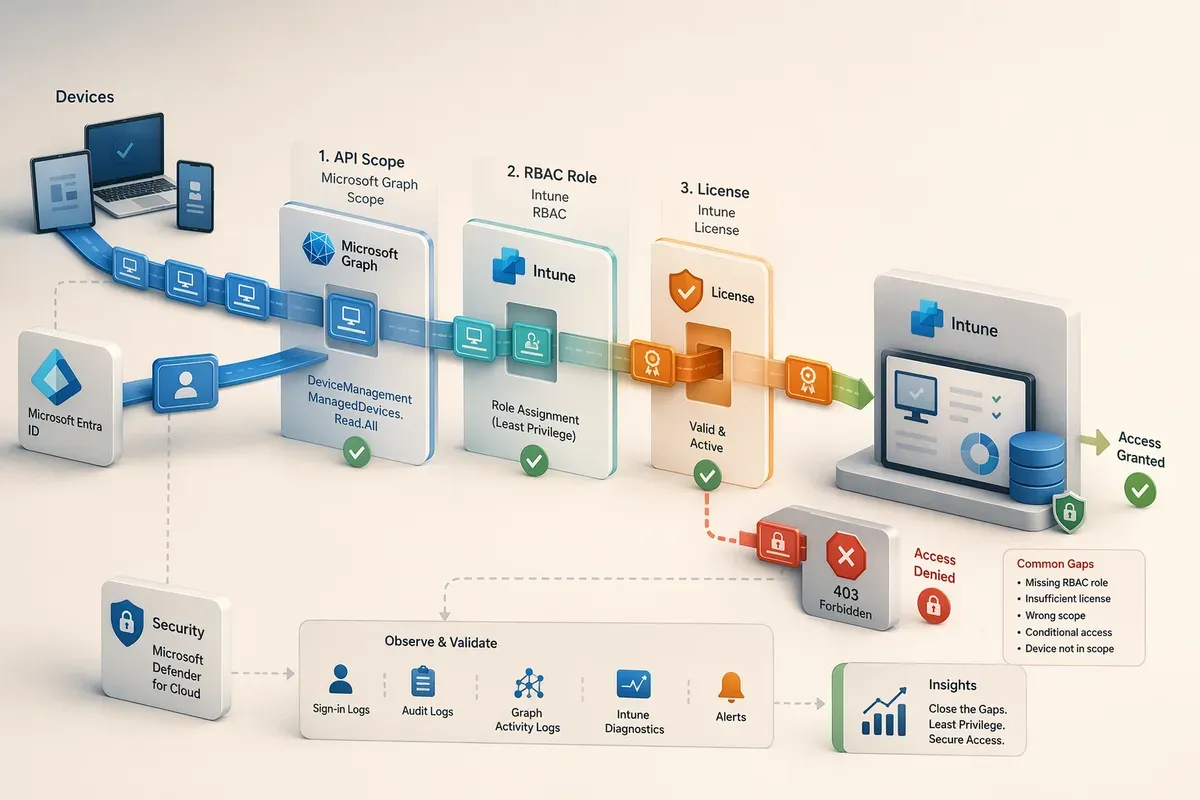
The permission you request is only half the story. In the Microsoft cloud, a call succeeds only when the API scope, the RBAC role, and the license all line up. Design for that gap — don’t assume it away.
Why?Why does a consented scope still 403?
Microsoft Graph is the front door to Intune, but Intune enforces its own
role-based access control behind that door. The Graph scope proves your app
is allowed to ask about managed devices. The Intune RBAC role proves the
signed-in identity is allowed to see them. Miss either one and you get the
same generic Authorization_RequestDenied — with no hint about which half is
missing.
The three layers you actually have to satisfy
For most Intune-over-Graph endpoints, “do I have permission?” is really three separate questions:
- API scope — the delegated (or application) Graph permission on the app registration, admin-consented for the tenant.
- Intune RBAC role — an Intune role (e.g. Intune Administrator, or a custom role with the matching read permissions) assigned to the signed-in user. Granting the Graph scope alone is not sufficient.
- License / tenant capability — some data simply doesn’t exist without the right license behind it.
Here are the exact endpoints I wired up in Portal 360° and what each one really needs:
| Data source | Endpoint | Delegated scope | Also required |
|---|---|---|---|
| Device compliance | GET /deviceManagement/managedDevices |
DeviceManagementManagedDevices.Read.All |
Intune RBAC role |
| Enrollment — DEP | GET /deviceManagement/depOnboardingSettings |
DeviceManagementServiceConfig.Read.All |
Intune RBAC role |
| Enrollment — VPP | GET /deviceAppManagement/vppTokens |
DeviceManagementApps.Read.All |
Intune RBAC role |
| Enrollment — APNs | GET /deviceManagement/applePushNotificationCertificate |
DeviceManagementServiceConfig.Read.All |
Intune RBAC role |
| Risky users | GET /identityProtection/riskyUsers |
IdentityRiskyUser.Read.All |
Entra ID P2 license |
That last row is the “license” layer in action: riskyUsers returns nothing
useful without Entra ID P2, no matter how perfect your scopes and roles are.
Why?Delegated vs application — which should Intune use?
Use delegated when the data should be attributed to (and filtered by) the signed-in admin — it respects that user’s Intune RBAC scope automatically. Use application (app-only) for tenant-wide aggregates that are safe to share across users and don’t depend on who’s looking. In Portal 360° the tenant-wide compliance and enrollment tiles run app-only; anything scoped to “what this admin can see” runs delegated. Same endpoints, deliberately different tokens.
Stop guessing: instrument the gap
The reason that first 403 cost me an afternoon is that the error is identical
whether you’re missing a scope, a role, or a license. So instead of guessing per
endpoint, I made the gaps observable. Every delegated call that comes back
401/403 with an authorization error records exactly what was missing:
{
  "source": "device-compliance",
  "endpoint": "GET /deviceManagement/managedDevices",
  "delegatedPermission": "DeviceManagementManagedDevices.Read.All (delegated)",
  "status": 403,
  "errorCode": "Authorization_RequestDenied",
  "count": 7,
  "firstSeen": "2026-06-02T12:34:56.000Z",
  "lastSeen":  "2026-06-02T15:01:18.000Z"
}
Those entries surface on an admin-only route, so instead of reading server logs I get a live list of which permission each Intune tile is actually waiting on. When an admin reports “the compliance widget is empty,” the answer is right there — usually a missing Intune RBAC role, not a missing scope.
Why?Why a tracker beats try/catch guesswork
A 403 is a dead end if all you do is swallow it. Recording the source, endpoint, scope, and error code turns a vague “insufficient privileges” into a concrete work item: grant this role to this user. It also reveals patterns — if every DEP/VPP/APNs endpoint fails for the same admin, they’re missing the RBAC role, not five separate scopes.
The pattern that keeps you honest: never hand the browser a token
There’s a structural lesson underneath the permission one. In Portal 360° the browser never holds a Graph token. Every Intune call goes: browser → my own server route → Graph. The server acquires the token, applies the scope, and returns typed JSON. This is the Backend-for-Frontend (BFF) pattern, and it’s what makes least-privilege enforceable:
- Tokens, scopes, and refresh logic live server-side where they can’t leak.
- The client asks for data, not permission — it can’t over-request.
- One place decides delegated vs app-only per endpoint.
Why?The caching gotcha I hit (Next.js specifics)
If you cache tenant-wide aggregates, don’t acquire a delegated client
inside the cached function. Delegated token acquisition reads cookies/headers,
and frameworks like Next.js forbid that inside a cached scope
(headers() inside a function cached with unstable_cache). The fix: acquire
the delegated client outside the cache and pass it in, or use an app-only
client for data that’s the same for everyone. Tenant-wide compliance counts
are a perfect app-only candidate.
Your least-privilege checklist for Intune-over-Graph
Before you blame the scope, walk the three layers:
- Scope — is the exact Graph permission consented for the tenant, and present on the token you’re actually sending (sign out/in after granting)?
- RBAC role — does the signed-in identity hold an Intune role that covers this read? Graph scope alone will 403.
- License — does the data require Entra ID P2, an Intune plan, or another entitlement to exist at all?
- Token flow — is the token minted server-side (BFF), and is it delegated vs app-only on purpose for this endpoint?
Get all four right and the 403 disappears. Get them wrong in any single layer and you get the same unhelpful error — which is exactly why it’s worth instrumenting.
Why this matters beyond Intune
This isn’t really an Intune quirk. It’s how the whole Microsoft cloud works: identity, RBAC, and licensing are separate gates, and a green checkmark on the app registration only clears the first one. The moment you build against a second Microsoft surface, the same trap is waiting — the details just change. I ran into the exact same “the scope was only half of it” lesson wiring up a Copilot Studio agent, where the surprise wasn’t a missing role but that turning on SSO changed what my client was even allowed to do. I’ll publish that companion post soon — subscribe to the RSS feed if you want to catch it.
More Intune field notes live in the Intune & Endpoints topic.
Last verified: July 2026, against the endpoints and permissions used in Portal 360°.
Get the latest learnings
Occasional notes on Azure, AI, and cloud architecture. No spam, unsubscribe anytime.