Portal of Portals: One Console for Every Admin Portal
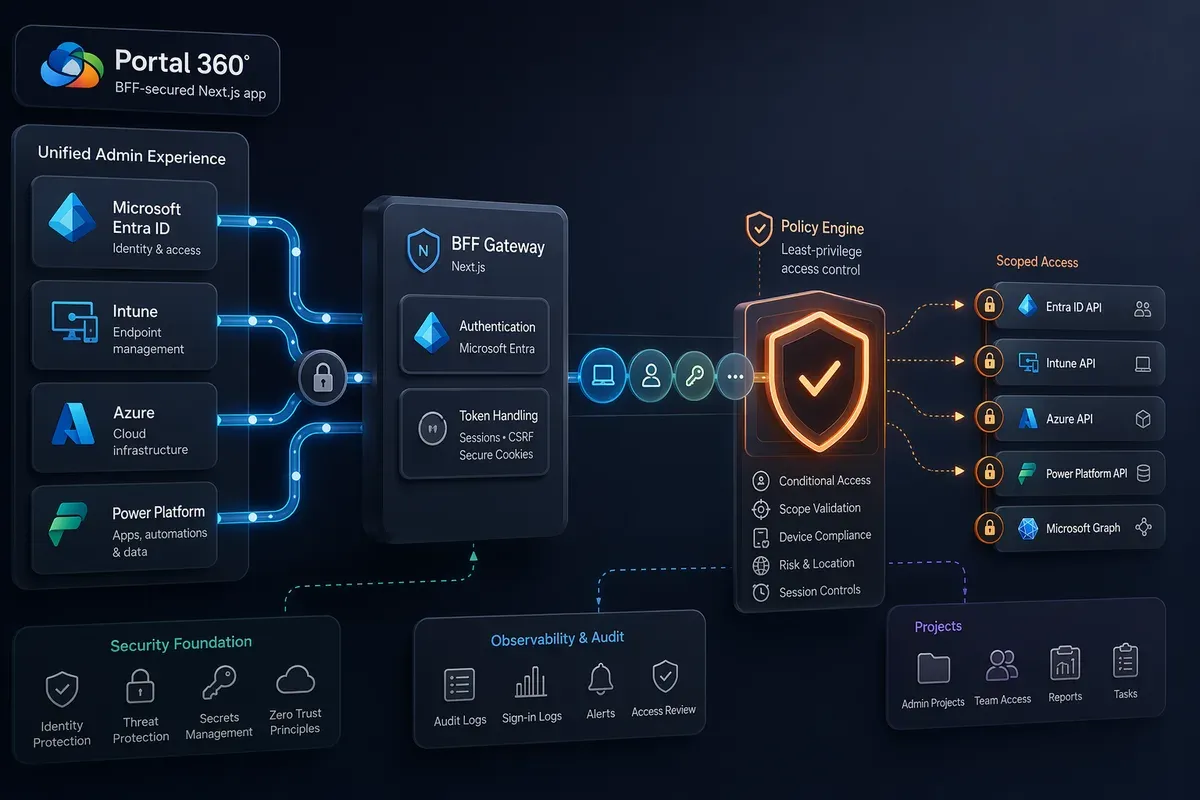
Count the admin portals you touched this week. Entra for a user’s sign-in logs. Intune for a device that fell out of compliance. The Azure portal for a runaway cost alert. The Power Platform admin center for a DLP policy. Exchange for a stuck mailbox. Each one is a separate login, a separate navigation model, and a separate place to forget you left a tab open.
I got tired of the bookmark folder. So I built Portal of Portals — branded Portal 360° — a single console that folds all of those surfaces into one authenticated workspace. This is the deep dive I promised when I first mentioned it: what it actually is, why it exists, what it talks to, and how it stays safe while doing it.
One thing up front, because it matters: this is an independent project, not affiliated with, endorsed by, or supported by Microsoft. It’s a community tool I build in the open (well, in a private repo for now). For anything compliance- critical, you should still use Microsoft’s official portals. Portal 360° is about speed on the high-frequency stuff, not replacing the systems of record.
It’s also a handy way to stand up purpose-built consoles for people who don’t need the whole admin universe — a service desk view scoped to password resets, user lookups, and device actions; a manager view with just licensing, group membership, and a few reports; an on-call view that leads with service health and recent incidents. Instead of handing someone the full Entra or Intune portal (and the cognitive load and blast radius that come with it), you can carve out exactly the surface their role actually uses.
Heads up — the repo is currently private, but I’m planning to open source it very soon. If you’d like to help test it out before then, send me a message with your GitHub alias and I’ll add you to it.
What it is
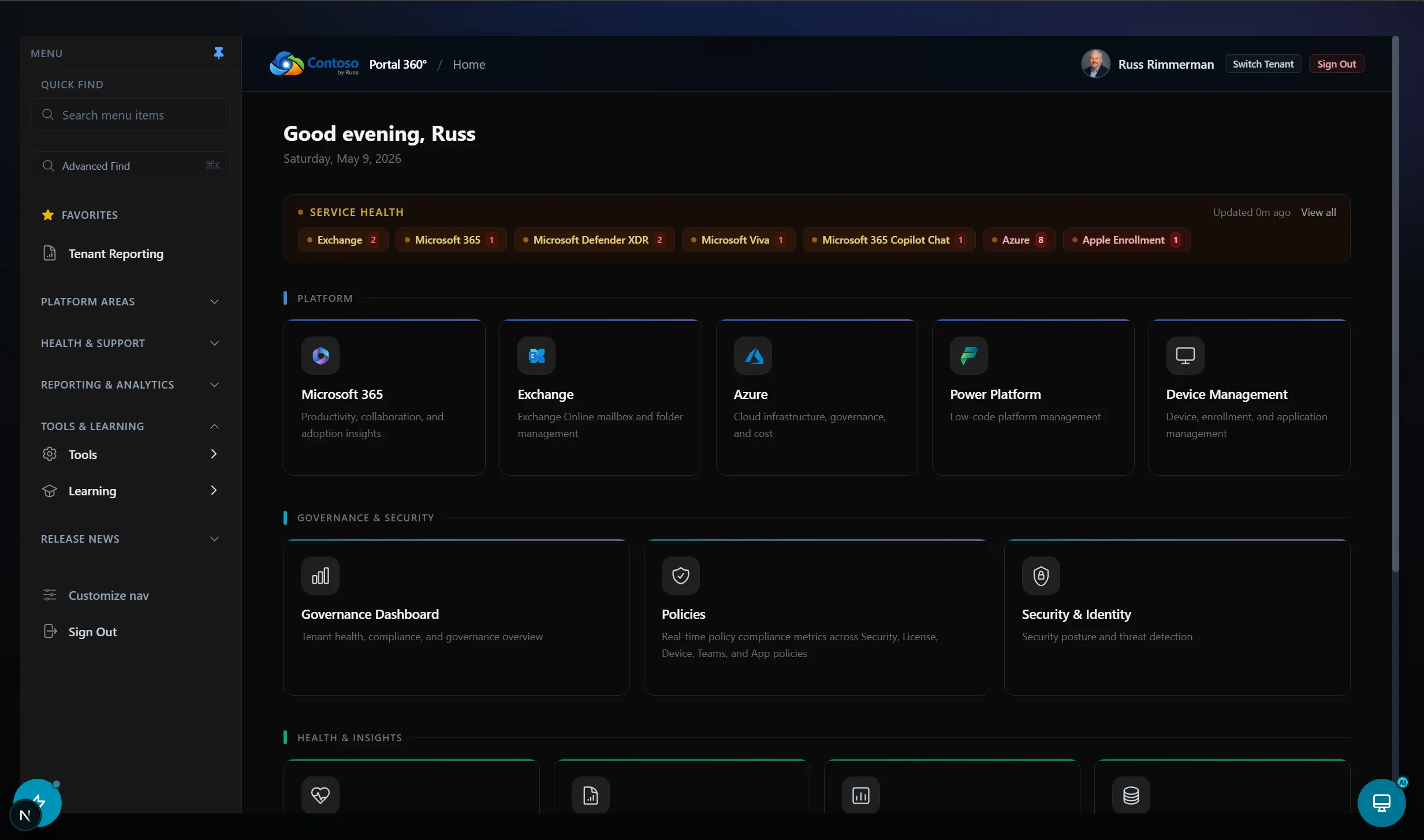
Portal 360° is a unified administration portal for the Microsoft cloud. It brings identity, security, device, collaboration, and platform operations into one experience so IT and MSP teams can run their common workflows without the context-switch tax.
The scope is genuinely broad. Today it covers:
- Microsoft 365 — licensing, Copilot usage, and agent identity/registry pages
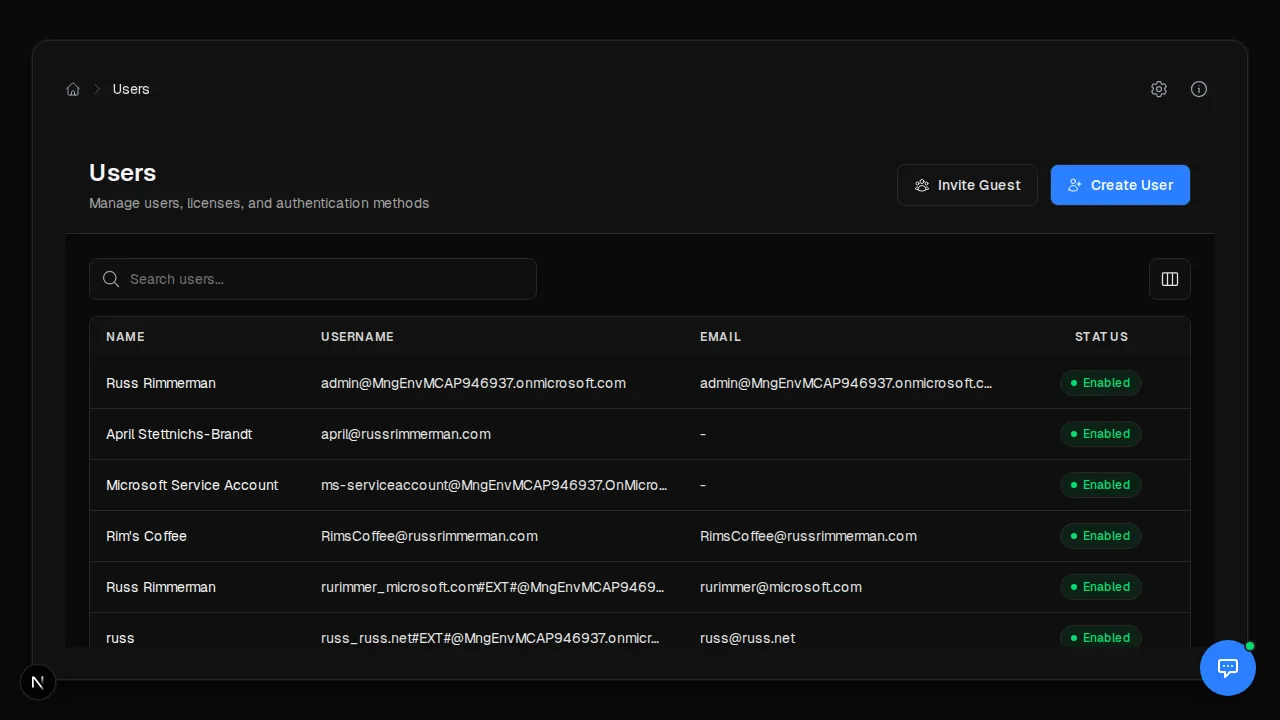
- Identity & Security — users (including a “User 360” view), groups, apps and service principals, PIM, entitlement management, sign-ins, Conditional Access, risky users, Secure Score, and audit logs
- Azure infrastructure — org hierarchy, resources, networking, VMs, deployment stacks, policy and compliance, Advisor, cost, budgets, forecasts, reservations, and monitoring
- Power Platform — environments with a self-service request form, Copilot Studio, DLP, governance, billing and capacity, Dataverse analytics, and a tenant-settings reference that stays in sync with Microsoft’s docs
- Device management — Intune devices, compliance and configuration, reports, and the Windows update catalog
- Collaboration & health — Exchange mailboxes and folders, Teams, SharePoint, and service health
- Operations & integrations — ServiceNow, a human-review queue for Copilot Studio workflows, Azure DevOps, Microsoft Fabric, a reporting hub, AI Foundry, a Graph Explorer, and a DOCX editor
Under the hood that’s a Next.js app with more than 700 API routes. It’s a lot of surface area, which is exactly why the boring parts — auth, scopes, rate limits — had to be right from the start.
Why I built it
Two reasons, one selfish and one that generalizes.
The selfish one: I do this work every day, and the portal sprawl is real. The Microsoft admin experience is a federation of consoles, each excellent in isolation and each unaware of the others. A single “who is this user, what do they have, and what’s wrong right now” question can span five portals. I wanted one front door.
The one that generalizes: I kept building smaller tools — Pulse 360°, the Microsoft Communications Portal — and each lived on its own. Portal 360° is the connective tissue. It’s the hub that ties the hubs together, so there’s one place to sign in and one consistent way to act, rather than a folder full of bookmarks pointing at a dozen different security models.
There’s also an honest personal thread here: I’m a Microsoft architect who came to real software development late, through AI-assisted coding. A project with 700+ routes is not something I’d have attempted the old way. Being able to describe a page, wire it to the right API with the right scope, and review the result changed what “one person can build” means. Portal 360° is the biggest thing I’ve built that way.
The goals
I set a few rules before writing much code, and they’ve shaped every decision since:
- Security first, always. No token ever reaches the browser. Every route proves the caller is authenticated before it does anything.
- Least privilege by default. A page that reads users asks for a read scope, not a write one. Writes are explicit and narrow.
- Audit-ready. Actions should be traceable, and sensitive operations should leave a record.
- Stay current without babysitting. Where Portal 360° mirrors a Microsoft schema, it should notice when Microsoft changes it — automatically.
- Be honest about limits. When a data source is an estimate, say so in the UI.
How it works: the BFF architecture
The whole thing is built on a Backend-for-Frontend pattern. Privileged API calls never happen in the browser. The React front end calls the app’s own API routes; those routes run on the server, hold the tokens, and talk to Microsoft on the user’s behalf.
Why?Why BFF instead of calling Graph from the browser?
If the browser holds an access token, that token is exposed to every script on the page and to anyone who cracks open dev tools. A BFF keeps tokens on the server, hands the browser nothing but a session cookie, and gives you one place to enforce auth, scopes, CSRF, and rate limits. For an admin tool touching Graph and ARM, that’s not optional.
The stack is Next.js 16, React 19, TypeScript 5, Tailwind 4, and NextAuth (Auth.js) v5. A few of those are on the bleeding edge — NextAuth v5 is still in beta as I write this — so I pin versions and re-verify behavior when I bump them.
Every one of those 700+ API routes starts the same way: verify the session, or reject the request. There’s a small helper for it, and the rule is absolute — an API route with no auth check is a bug, and there’s tooling in the repo whose only job is to find routes missing that check.
export async function GET(request: NextRequest) {
  const session = await verifyAuth()
  if (!session) return UNAUTHORIZED_RESPONSE()

  // ...protected logic, using a delegated token acquired server-side
}
Authentication and least-privilege scopes
Users sign in with Entra ID through an app registration. From there, Portal 360° prefers delegated, on-behalf-of tokens over app-only credentials for anything a user triggers. That means the app acts as the signed-in admin, inside their permissions — so RBAC and Conditional Access still apply, and the audit trail shows a person, not a faceless service principal.
Why?Delegated (OBO) vs. app-only — why it matters
App-only tokens carry the application’s permissions regardless of who’s driving. Powerful, and easy to over-grant. Delegated on-behalf-of tokens carry the user’s effective permissions, so a helpdesk admin can’t suddenly do Global Admin things just because the app could. For a multi-surface admin console, delegated-by-default is the safer posture.
Scopes are centralized in one file so nothing gets sloppy. Reads ask for read scopes; writes name the specific write scope so it surfaces in incremental-consent prompts. A sampling of what’s registered:
- Graph reads —
User.Read.All,Directory.Read.All,Group.Read.All,AuditLog.Read.All,Reports.Read.All,Device.Read.All - Graph writes —
User.ReadWrite.All,Group.ReadWrite.All,RoleManagement.ReadWrite.Directory,DeviceManagementManagedDevices.ReadWrite.All - Azure Resource Manager —
https://management.azure.com/user_impersonation - Exchange Online —
https://outlook.office365.com/EWS.AccessAsUser.All - Power Platform —
https://api.bap.microsoft.com/.default,https://service.powerapps.com/.default - Microsoft Fabric —
https://api.fabric.microsoft.com/.default
Keeping the scope map in one place makes over-permissioning a review problem instead of an accident scattered across 700 files.
The APIs it talks to
Portal 360° is, fundamentally, a careful aggregator of a lot of APIs. The main ones:
- Microsoft Graph for identity, groups, devices, audit logs, reports, and most of the M365 surface.
- Azure Resource Manager (
management.azure.com) for subscriptions, resources, cost, policy, and monitoring. - Exchange Online (EWS, as the user) for mailbox and folder operations.
- The M365 admin center’s internal APIs (
admin.microsoft.com) for the bits Graph doesn’t expose. - Power Platform APIs — the BAP service, Power Apps service, and Fabric — for environments, governance, and analytics.
- The public MSRC CVRF v3 feed for Windows CVE data (no auth required).
- Microsoft Defender for Endpoint TVM (
securitycenter.microsoft.com) as an optional, higher-fidelity data source. - Plus integrations like ServiceNow, Azure DevOps, Application Insights, and AI Foundry.
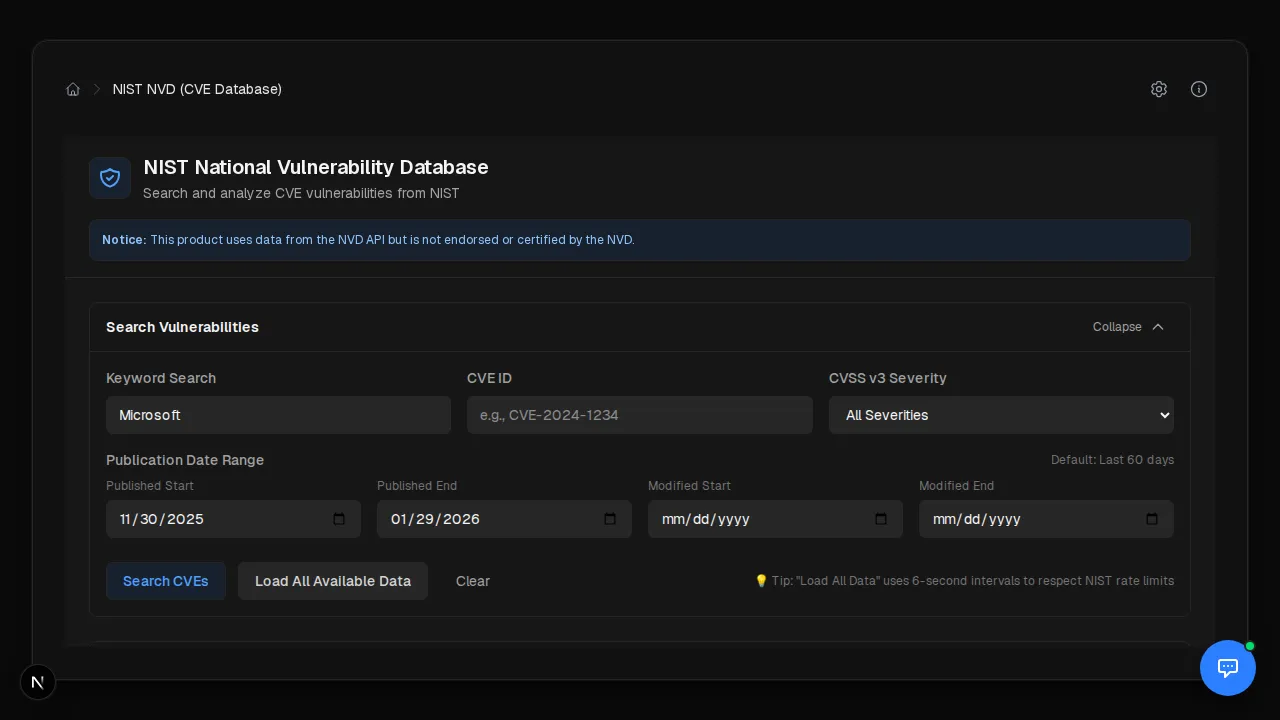
A concrete example shows how much thought the aggregation takes. The Windows CVE
Report reproduces Intune’s Autopatch CVE report — which Microsoft doesn’t expose
through any API. So Portal 360° ships two interchangeable backends. The default
pulls ~90 days of Windows CVEs from the public MSRC feed and joins them against
Intune managedDevices to estimate exposure. It works with zero extra licensing,
and the UI is honest that the “devices missing update” count is a deliberate
undercount. For tenants with Defender for Endpoint Plan 2, an opt-in backend
swaps in Defender’s vulnerability assessment for authoritative per-CVE machine
counts. Same page, different data source behind an env flag — and the report tells
you which one you’re looking at.
Keeping it secure past the front door
Auth checks are the floor, not the ceiling. A few other layers matter:
- RBAC on top of Entra. Beyond “are you signed in,” routes can check role and permission, so the app can gate sensitive actions even further than the tenant would.
- CSRF protection on state-changing requests. Portal 360° validates the request origin and compares a CSRF token using a constant-time comparison, so a malicious site can’t ride a logged-in admin’s session to POST something nasty.
- Distributed rate limiting. A Redis-backed sliding-window limiter enforces per-user, per-route limits with separate, stricter budgets for writes than reads, and tighter limits for unauthenticated callers. It falls back to in-memory only for local dev; production runs on Redis (authenticated with Entra ID) so limits hold across replicas.
- Server-side token storage. Tokens live in a server-side store, never in the browser, and the Redis connection itself uses Entra ID auth rather than a connection-string secret where possible.
None of these are exotic. They’re the unglamorous OWASP-adjacent basics that a tool with this much reach absolutely has to get right.
Staying current without babysitting
Two of Portal 360°’s integration surfaces mirror Microsoft schemas that drift over
time: the Power Platform tenant-settings registry and the supported
inventory API version. Rather than let those rot, a weekly GitHub Actions
workflow diffs them against their upstream Microsoft sources — the Terraform
Power Platform provider docs and the inventory-api.md in the Microsoft Docs
repo — and opens a pull request whenever it spots a change. New tenant-settings
attributes even get stub entries with Microsoft Learn links attached. I review the
PR instead of manually chasing a moving target.
There’s also a full interactive API reference baked in. Any authenticated user can hit an OpenAPI schema, Swagger UI, and ReDoc. Swagger’s “Try it out” reuses the current session cookie and forwards the CSRF token automatically, so it works against a running instance with no manual token juggling — a nice payoff of the BFF design.
Where it stands, honestly
Portal 360° is still private while I harden it, and I’m deliberate about that. Seven hundred routes across this many privileged APIs is a big attack surface, and I’d rather ship it when the security story is airtight than rush a public repo.
It’s also worth repeating the disclaimer, because I mean it: this is an independent tool, provided as-is, with no warranty and no Microsoft affiliation. You’re responsible for making sure your use fits Microsoft’s terms and your own compliance requirements, and you should keep using the official admin portals for critical operations. Portal 360° is for the daily grind, not the audit of record.
If a single, security-first console for Microsoft administration sounds useful — or if you’ve solved the portal-sprawl problem a different way — I’d genuinely like to compare notes. I’ll share more as it moves toward something I can show off in public.
Get the latest learnings
Occasional notes on Azure, AI, and cloud architecture. No spam, unsubscribe anytime.