Coding with AI: A Neurodivergent Non-Coder's Guide to Building Real Apps
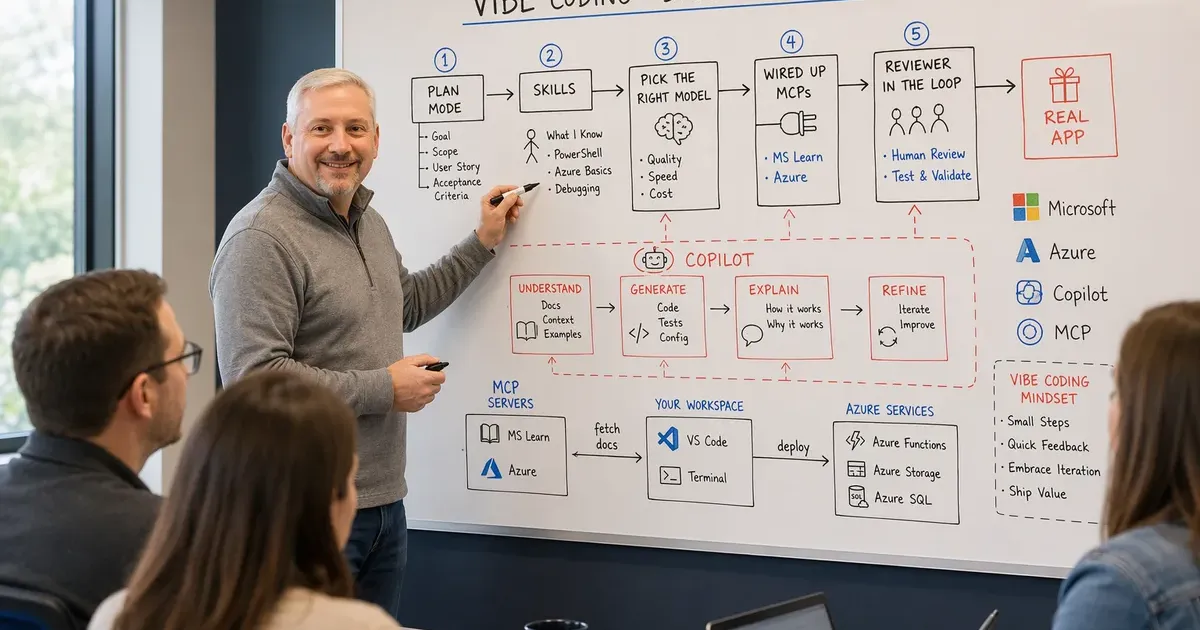
Let me get the confession out of the way first: I can’t really code.
I’m a Microsoft architect, so I know my way around PowerShell. I can string together a script to bulk-edit some Entra users or pull a report out of Graph. But sitting down to learn to code — proper application development, data structures, the whole thing — I never had the attention span or the patience for it. Every time I’d try, the dreaded squirrel interrupted my train of thought.
That’s not laziness, and I’ve stopped pretending it is. My whole life, holding focus on a single thing from start to finish has been a fight. Between the idea and the finish line, my mind gets diverted a dozen times — a new tangent, a better idea, a shinier problem — and the thread I was holding just drops. The traditional path into coding demands long, unbroken stretches of exactly the kind of focus my brain doesn’t hand out for free. For a neurodivergent mind, that path isn’t just hard. It’s practically designed to lose you.
And yet, over the last year or so, I’ve built real, working software. Multiple apps. The thing that changed wasn’t me suddenly growing discipline. It was learning how to vibe code — describing what I want in plain language and letting AI do the heavy lifting, then steering it until the thing actually works.
This post is the collection of lessons I wish someone had handed me on day one. If you’re technical-adjacent but not a developer, this is for you.
First, what “vibe coding” actually means for me
Vibe coding isn’t “type a prompt, get an app, walk away.” That’s the marketing version, and it falls apart the moment you build anything real. What it actually means is a conversation: I describe the outcome, the AI proposes an approach, I push back, it adjusts, and slowly we converge on something that works.
The skill isn’t writing code anymore. The skill is knowing what good looks like, asking the right questions, and recognizing when the AI has wandered off into the weeds. My PowerShell background helps here more than I expected — not because I’m writing the code, but because I can read it well enough to smell when something’s off.
Here are the specific things that took me from “cool demo” to “I actually ship this stuff.”
Lesson 1: Use plan mode before you write a single line
The biggest mistake I made early on was letting the AI start coding immediately. You ask for a feature, it enthusiastically writes 300 lines across four files, and half of them are solving the wrong problem. Now you’re debugging a plan you never agreed to.
Plan mode fixed this. Before any code gets written, I have the AI lay out its plan: what files it’ll touch, what the approach is, what the tradeoffs are. I read it, I argue with it, I correct the assumptions. Only when the plan is right do we start building.
It feels slower. It is dramatically faster. A five-minute planning conversation saves an hour of untangling code that went the wrong direction. If you take one thing from this post, it’s this: plan first, code second.
Lesson 2: Skills are how you stop repeating yourself
Once you’re doing this every day, you notice you keep explaining the same things. “Here’s how I like my commits formatted.” “Here’s the tone for my blog.” “Here’s how we structure an Azure deployment.” Re-typing that context every session is exhausting and inconsistent.
Skills solve this. A skill is a reusable chunk of instructions the AI pulls
in automatically when it’s relevant. Instead of re-explaining how to write a blog
post every time, I have a blog-post skill that captures the structure, the
tone, and the rules — and the AI just uses it. This very post was written with
one.
Think of skills as promoting your best prompts from throwaway messages into permanent, reusable capabilities. The first time you catch yourself explaining the same thing twice, that’s your signal to make a skill.
Lesson 3: When the skill you need doesn’t exist, build them
Here’s where it gets fun. There’s no rule that says you can only use the skills someone else made. When I hit a workflow that didn’t have a skill — a specific way I wanted to Automatically generate the starter files and folder structure for a project so you don't have to build it all by hand. a project, or a checklist I run before deploying — I just had the AI help me write the skill itself.
That’s the moment vibe coding clicked for me. I wasn’t just building apps; I was building the tools that build the apps. You describe the process you want codified, the AI drafts the skill, you refine it, and now that capability exists forever. It’s compounding leverage — every skill you create makes the next project faster.
You don’t need to know how to code to author a skill. You need to know your own process well enough to describe it. Architects are good at that.
Lesson 4: Match the model to the job
Not every task needs your most powerful model, and not every model is good at every task. Early on I used one model for everything and wondered why some things felt sluggish and others felt shallow. Learning to switch was a real unlock.
Here’s my rough rule of thumb:
- Heavy reasoning, architecture, gnarly debugging — reach for the most capable frontier model. When I’m designing how an app should be structured or untangling a bug that spans several files, I want the deepest thinker in the room, even if it’s slower.
- Fast, well-defined edits — a lighter, quicker model is perfect. Renaming things, small tweaks, Repetitive, standardized code that you have to include to make something work, but that doesn't involve any real decisions., “add a button here” — you don’t need a sledgehammer for a thumbtack.
- Long, sprawling context — pick the model that handles big How much text an AI can consider at once — the prompt, your files, and the conversation so far. A bigger window lets it reason over more of your codebase at a time. gracefully when I’m asking it to reason across a whole codebase.
The meta-lesson: treat models like tools in a belt, not a single hammer. Being deliberate about which one you grab saves time, saves money, and gives better results.
Lesson 5: MCPs give the AI real, current knowledge
This one was the biggest surprise. Out of the box, an AI model knows a lot, but it doesn’t know your Azure environment, and its training data has a cutoff date that’s always drifting out of date. MCP — the Model Context Protocol — is how you close that gap. It lets the AI reach out to live tools and authoritative sources instead of guessing.
Two that changed how I work:
- The Microsoft Learn MCP — instead of the AI half-remembering how some Azure service works from stale training data, it pulls the current official documentation from Microsoft Learn. For someone in the Microsoft ecosystem, where things change weekly, this is enormous. The answers stop being “probably right” and start being actually right, with sources.
- The Azure MCP — this one lets the AI interact with real Azure context rather than working from generic examples. When I’m building something that touches Azure, having the AI grounded in the actual services and shapes I’m working with beats hand-copying details back and forth. It also ships an Azure best-practices tool the AI can call before it writes or deploys — so I get secure defaults like A way for an Azure service to prove who it is and get access to other services automatically, so you never store a password or key in your code., A secure Azure vault for storing secrets like passwords, keys, and certificates, instead of leaving them in your code or config files., and Granting each account or service only the exact permissions it needs and nothing more, to limit the damage if it's ever compromised. roles instead of the hard-coded-secret shortcuts a model reaches for on its own. I make a habit of telling it to check Azure best practices first, and I lead my instructions with security so it stays the priority, not an afterthought.
The pattern behind both: an AI that can look things up and take grounded action is in a different league from one working purely from memory. If you’re in the Microsoft world and haven’t wired up the MS Learn MCP yet, start there.
Lesson 6: Put a reviewer in the loop — especially for security
Here’s the lesson that scared me straight. On one project — Pulse 360°, a public dashboard that pulls in Microsoft’s update feeds — I stopped working with a single AI and gave it a team. A lead, a frontend specialist, a backend specialist, a data-integrations specialist, a tester, and, crucially, a reviewer whose entire job was responsible-AI and security. Each one had a defined role and read from a shared, append-only decisions ledger so nobody re-litigated settled calls or lost the plot between sessions.
That reviewer earned its keep almost immediately. The builder agents had wired up the feed rendering and it worked — the pages looked great. But the reviewer flagged something the demo would never surface: eight different components were rendering untrusted HTML from external feeds straight into the page with no Cleaning incoming data to strip out anything dangerous — like scripts hidden in text — before you display or store it.. On a public site, that’s a live Often shortened to XSS: a web attack where malicious code is smuggled into a page and runs in another visitor's browser, letting the attacker hijack their session. hole. One poisoned feed item and any visitor’s session is fair game.
We stopped everything. The fix — centralized server-side sanitization, an image proxy, an https-only link policy — was sequenced as its own isolated milestone that shipped before any new features. Not because I’d asked for a security review, but because someone in the room was always looking for exactly that.
The lesson isn’t “hire five agents.” It’s this: vibe coding will cheerfully generate code that runs, demos clean, and is quietly unsafe. A model optimizing for “make it work” is not optimizing for “make it safe.” So put a step in your process whose only job is to be suspicious — whether that’s a dedicated reviewer agent, a security-focused pass where you tell the AI to hunt its own vulnerabilities, or simply your own refusal to ship until something has actually been reviewed. If I hadn’t, that XSS hole would have gone live.
The mindset shift that made it all work
Under all these tactics is one attitude change. I stopped thinking of myself as someone who needed to become a developer and started thinking of myself as someone who directs development. My job is judgment: knowing what to build, recognizing good work, and steering when things drift.
The compiler used to be my enemy — a wall of errors I didn’t have the patience to climb. Now the AI climbs it and I read the summary. That reframing is the whole game. I didn’t get more patient. I got a collaborator who’s endlessly patient for me.
There’s a quieter reason this works for a brain like mine. When my focus scatters — and it does, constantly — the AI holds the thread. The plan, the context, the decisions we made an hour ago don’t evaporate the moment my attention wanders off to something else. I can get pulled in three directions, come back, and pick up exactly where we left off. For someone who has lost countless projects in that gap between starting and finishing, that’s not a convenience. It’s the whole difference between finishing and not.
Where to start if you’re in my shoes
If you’re technical but not a coder, here’s the shortest path I know:
- Turn on plan mode and refuse to let the AI code before you’ve agreed on a plan.
- Steal a skill — grab an existing one that matches something you do often.
- Build your first skill the next time you catch yourself repeating context.
- Wire up the MS Learn MCP so your answers are grounded in current docs.
- Notice which model you’re using and start switching deliberately.
- Add a review step — a dedicated reviewer, a security-hunting pass, or just a rule that nothing ships unreviewed. Assume the working code might be unsafe.
None of that requires you to learn to code. It requires you to be clear about what you want — and if you’ve made it this far in a career adjacent to technology, you already have that skill.
I spent years believing I’d missed the boat on building software. It turns out I was just waiting for the right way in. If you’ve been telling yourself the same story, consider this your nudge.
If you’re experimenting with any of this — or you want to compare notes on skills, models, or MCPs — reach out anytime. I’d genuinely love to hear what you’re building.
Get the latest learnings
Occasional notes on Azure, AI, and cloud architecture. No spam, unsubscribe anytime.