From Excel Compliance Tracker to Working App in 25 Minutes
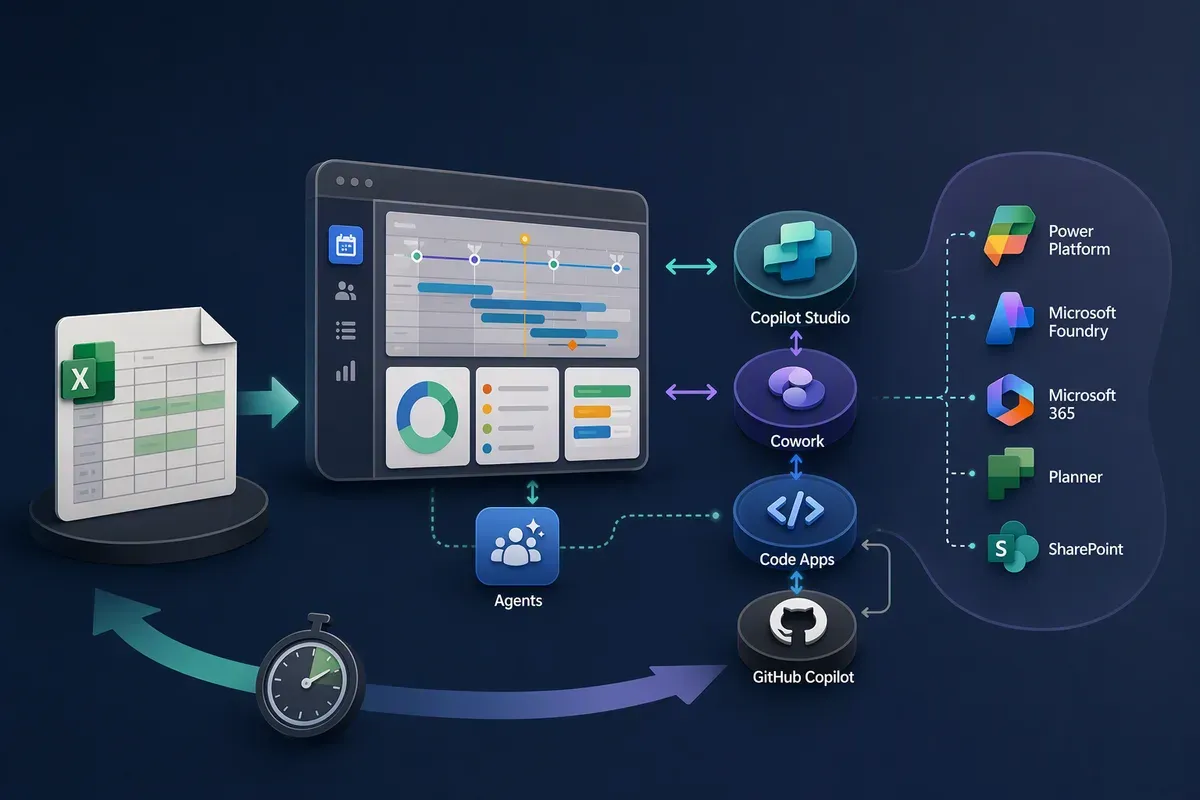
A customer recently sent me a request on behalf of one of their end users. The team runs all of its quarterly and annual compliance reports out of an Excel spreadsheet that someone built years ago, and they update it by hand every time something changes. Sound familiar?
I had been building apps with the managed runtime in Cowork and Copilot Studio, so I tried something. I pasted their question into Copilot Studio’s app builder, which is in preview, to see what it would produce from that little input. It was also a chance to collect another real-world example of what building an app costs in Copilot Credits.
The question, almost verbatim
The user wanted a better report and compliance calendar with task tracking. They had already researched it and found one common option: use Power Automate to keep Planner and Outlook in sync. They asked whether that was the best approach, how I’d recommend setting it up, and whether there was an even better way to solve the challenge.
I skipped their opening sentence and their last paragraph, the part asking for my recommendation. I pasted the rest into the app builder in Copilot Studio word for word from the end user’s email:
We have several quarterly and annual reports that are due throughout the year and are the responsibility of different teams. Right now, we track everything in an Excel spreadsheet, but it requires constant manual updates.
Our goal is to have report due dates visible and connected across Microsoft Teams Planner, Outlook Calendar, and SharePoint, while also being able to track ownership, status, and completion. I have spent time researching different options and trying to determine the best way to make these systems work together. I know a group calendar can be displayed in SharePoint, but that alone does not provide the tracking features we need.
That’s the whole prompt. I gave it no design, no field list, and no sample data.
2:30 pm paste, 2:55 pm testable
I pasted the prompt at 2:30 pm. By 2:55 pm I had an app I could click through, edit, and add new reports to. That’s twenty-five minutes from paste to a working version 1.
Along the way it asked which SharePoint site to use and whether I wanted an existing list or a new one. I chose new, and it built the list and every column for me.
The first view you see is a project timeline. Each row is a team and each column is a month, grouped by quarter, with a marker for today. Every report is a pill on its team’s row with a status icon, and the header keeps a running count: 11 open, 1 overdue.
Everything the customer listed is on that one screen. Ownership is a field, status is a dropdown, and completion is a set of steps with a progress count (“0 of 3 done”). Frequency is there too, so a quarterly report is marked as quarterly. Overdue items turn red and say how many days late they are.
Adding a report takes one dialog: report name, agency or recipient, team, owner, frequency, period, and due date.
There’s also a list view for people who prefer rows to a calendar. It adds a plain-language due column, such as “Due in 7 days” or “Submitted Aug 5, 2026,” which is the part I’d expect a team lead to check first.
Fixing the first thing I noticed
The Owner field started as a plain text box, so nothing stopped someone from typing a name that doesn’t exist. I asked for a people picker instead, prompting it to display and search users from Microsoft Entra ID. By about 4 pm the field searched the tenant directory as I typed.
Connecting it to Planner and SharePoint
Later that evening I connected the app to Planner and SharePoint, as the customer asked. The Planner plan is called Compliance Reports, with one bucket per team and one task per report. Each task carries its steps as a checklist and its due date.
To be clear about “connected”: I asked my agent to do it, and it gave me the steps to build the flow that handles the background sync.
The part I wanted to check was whether the same report looked the same in each place. Take the Safety Incident Summary for Q3 2026. In Planner it’s in progress, due 10/31/2026, in the Safety bucket, with one of three checklist items done.
In the SharePoint list it’s the same record: team Safety, frequency Quarterly, period Q3 2026, due 10/31/2026, status In progress. The list has a column for the submission date, one for notes, and an Owner column that takes a person.
What it cost to build
This is the number I was most curious about. Building the app used 1,067 Copilot Credits, which is $10.67 at list price.
That’s worth planning for. Microsoft’s comparison of the standard and GitHub Copilot harnesses (the runtime layer between the model and your agent or app) is a useful way to think about it. Longer, multi-step reasoning can justify the extra consumption, and a lightweight interaction may not need it.
| Tradeoff | Standard harness | GitHub Copilot harness |
|---|---|---|
| Best-fit gain | An agent that tackles short, straightforward tasks, structured conversations, and bounded processes. | Advanced coordination for long-running, complex, multi-step business processes across tools, systems, and outputs. |
| When the scenario is less simple to complex | Context is distributed across topics, tools, prompts, variables, and subagents. Makers retain direct control but must reconcile more of the context and exception logic as the process grows. | Ideal for complex scenarios. Dynamically plans, selects tools, leverages memory, and recovers from exceptions, reducing overall guidance required by the maker. |
| When the scenario is simple | Ideal for simpler scenarios. Provides a proportionate runtime for short-running, straightforward tasks. | May introduce unnecessary reasoning, latency, and Copilot Credit consumption without materially improving the result. |
| Control and adaptability | Offers tighter control, but unexpected conditions generally require additional authored logic. | Continuously reasons from the latest state and can adapt when information, requests, or intermediate results change. It might retry a failed tool call, select another path, or resume after a conversational detour, but its execution path can be less predictable for agent-only solutions. |
| Latency and consumption profile | Well suited to high-traffic, user-facing scenarios where responsive interaction is important. | Longer latency and higher Copilot Credit consumption can be justified when advanced reasoning, large file processing, and orchestration create measurable value, but might be excessive for lightweight interactions. |
| Capability and maturity | Provides established features and channels, but some advanced models and new agentic capabilities aren’t available. | Provides access to the latest agentic capabilities and reasoning models, but customers should validate required features and channels as the experience matures. |
Harness tradeoffs, adapted from Microsoft Learn.
The full write-up on Copilot Studio harness differences is in Harnesses in Copilot Studio.
Power Automate is still a reasonable answer
Connecting Planner and Outlook with Power Automate is a well-worn pattern, and it’s what the customer’s research turned up. I’m not going to tell them it’s wrong.
What the experiment added was the other half of the answer: what the team will actually look at every day. A flow keeps systems in step, but someone still has to decide where owners, statuses, and due dates live. In 25 minutes the builder made that decision visible, with all of it on one screen.
Lessons learned: four ways to build it, and one way to buy it
This one spreadsheet problem could be solved four different ways. Which one fits depends on who is building and how much control they need.
The first two are Copilot Managed Runtime apps. Microsoft hosts them, people sign in with Microsoft Entra ID, tenant governance policies apply, and admins see them in the Microsoft 365 admin center. The third, a code app, is code you write that Power Platform hosts and governs. The fourth is an app you write with GitHub Copilot and host yourself.
I built this calendar in Copilot Studio. For Cowork, I’m going by Microsoft’s documentation. For code apps and GitHub Copilot, I’m drawing on earlier builds. Preview features can change, so check the status before you commit to one.
The baseline: buy an off-the-shelf application
Most teams in this spot shop for a compliance or project-tracking product first. That’s a sensible move, and the products are capable. The catch is that they’re built for the average customer. You rarely get your exact fields, your exact approval flow, or your exact view of the calendar, so you adapt your process to the product and live with the gaps. Each option below is measured against that baseline.
1. A Copilot Studio managed runtime app
You describe the app in a chat, Copilot Studio proposes a plan and generates a draft, and you refine it in an interactive preview before you publish. This is what I used here.
Where it wins
- Against off-the-shelf: the app matches your process from day one, because it’s built from your own description. This one took 25 minutes, with your fields, your teams, and your due-date logic.
- Against off-the-shelf: changes are a sentence away. I added the Entra ID people picker with one follow-up prompt, with no vendor roadmap or support ticket involved.
- Against the other build options: more control over the build, preview, and publish steps than a plain chat gives you, with no code to maintain.
- Governance comes with the runtime, so there’s no separate security design to write.
- Connectors reach the data you already have, such as SharePoint and Planner here.
What you need: Copilot Studio’s app preview experience, and Copilot Credits in the environment. This build used 1,067.
Skills needed: describing a process clearly, knowing which data lives where, and testing the result like a user. No programming.
2. A Cowork managed runtime app
From a Copilot Cowork session, you ask for an app or use the app builder skill, preview it, and publish it. Microsoft’s documentation positions it for business users who want to describe an app and keep working. Apps built in Cowork can also be opened and edited in Copilot Studio.
Where it wins
- Against off-the-shelf: you skip the evaluation, procurement, and rollout cycle. The app is built from the same conversation where the request showed up.
- Against the other build options: the least friction. You never leave the conversation you’re already in, and there’s no separate tool to learn.
- Same runtime, governance, and admin visibility as the Copilot Studio path.
- You can hand the app to Copilot Studio later when you want more control.
What you need: enrollment in the Frontier program and a Microsoft 365 Copilot license with Cowork access. Copilot Credits apply to building and running apps.
Skills needed: the same as Copilot Studio, with even less tooling to learn.
3. A Power Apps code app
You write a React or Vue app in your own editor, then publish it to Power Platform, which hosts it and handles identity and governance. I covered this in Power Apps Code Apps.
Where it wins
- Against off-the-shelf: the interface is exactly what you design. Dashboards, charts, and workflows follow your thinking, not a vendor’s template.
- Against the other managed options: full control of the interface and the code, and your source lives in your own repository.
- Against self-hosting: Microsoft Entra ID sign-in, Data Loss Prevention (“DLP”) policies, and Conditional Access apply without extra work.
- Generally available, with support for the 1,400+ Power Platform connectors Microsoft counts.
What you need: an admin to enable code apps on the environment, and a Power Apps Premium license for each end user.
Skills needed: comfort with a web project (Node.js, Git, a front-end framework), or the judgment to direct a coding agent and review what it writes. Environments and deployment basics help too.
4. An app built with GitHub Copilot
You write a normal application with GitHub Copilot’s help and host it wherever you choose. This blog is built that way, and the vibe coding series shows how.
The best example I have is InfiniAIBook, a self-hosted AI research notebook. I have no development experience, and I built it by vibe coding with GitHub Copilot, a few Copilot skills, and Microsoft Foundry models. When the app needed a model, GitHub Copilot deployed it in Foundry for me.
What it does today:
- Upload PDFs, web articles, and recordings, then chat with them and get answers that point back to the source passage.
- Hold live voice discussions about your sources.
- Turn sources into decks, infographics, quizzes, podcasts, and narrated videos.
- Run as a Node.js app, a single Docker container, or an Azure Container App, with the model provider of your choice.
It’s built for one person or one small trusted group. You can read the full overview in InfiniAIBook: A Self-Hosted AI Research Notebook, or try it from the GitHub repository.
Where it wins
- Against off-the-shelf: nothing is off the table. InfiniAIBook works the way I wanted because I described exactly what I wanted, down to the Studio formats and the model providers.
- Against the other build options: no platform boundaries. Any stack, any host, any design, and any model provider.
- Portable, because the code and the hosting are yours.
- The right choice when the app has to do something the other options can’t.
What you need: a place to host it, plus ownership of authentication, secrets, monitoring, and updates. Governance comes from what you build.
Skills needed: on paper, the broadest set: web development, authentication, cloud hosting, security review, and a deployment pipeline. In practice, GitHub Copilot and its skills can carry much of the typing, and InfiniAIBook shows that a non-developer can get a long way. What stays with you is judgment: deciding what to build, testing it, and reviewing the security before anyone else uses it.
Side by side
| Approach | Status as of this writing | Skill level | Fit to your process | Control | Governance you inherit |
|---|---|---|---|---|---|
| Off-the-shelf application | Generally available | Administrator | Approximate | Lowest | Depends on the vendor |
| Copilot Studio managed runtime | Preview | Business user or maker | Exact | Medium | Full |
| Cowork managed runtime | Preview (Frontier) | Business user | Exact | Lower | Full |
| Power Apps code app | Generally available | Developer, or an agent-directing maker | Exact | High | Full |
| GitHub Copilot app, self-hosted | Not applicable | Developer, or an agent-directing maker | Exact | Highest | None, you build it |
Going down the list, you gain control and take on more of the engineering, security, and operations work. When a managed runtime or Power Platform hosts the app, those pieces come built in.
How I’d choose
For a spreadsheet like this one, I’d start in Copilot Studio or Cowork. A working prototype in under an hour tells you more than a requirements meeting does, and it costs very little to throw away. If the interface needs something the builder can’t produce, I’d move to a code app. I’d only go self-hosted when the requirements fall outside what Power Platform or Copilot Managed Runtime can host. And if an off-the-shelf product already fits your process closely, buying it is still a good call.
That’s my opinion for this kind of workload, not an official Microsoft position.
What carried over to every approach
- Paste the real request. The customer’s own words named the fields that mattered: ownership, status, completion, and due dates. I didn’t need to translate them into a spec.
- Test it like a user. The Owner text box looked fine until I tried to use it. A short follow-up fixed it, but only because I clicked through the app.
- Look at every system it touches. Check the Planner board and the SharePoint list, not just the app, before you trust the sync. I covered the review habit in more depth in Six Business Apps in One Sunday.
If your team has a spreadsheet that runs a process, pick one of the four and build version 1 this week. Paste what you’d tell a colleague, publish to a test environment, and click through it before you decide what to build for real. Then check how many Copilot Credits it took, so your next decision has a real number behind it.
Get the latest learnings
Occasional notes on Azure, AI, and cloud architecture. No spam, unsubscribe anytime.
Related articles
Finding GitHub Copilot Harness Agents Before PPAC Shows Them
The Power Platform admin center still doesn't flag which Copilot Studio agents run on the GitHub Copilot harness. The isCLIAgent property does, and Microsoft has now published governance guidance built on it.
Six Business Apps in One Sunday with Copilot Studio's Copilot Managed Runtime App Studio
I had an agent build six demo apps in Copilot Studio in one day, then wire one to live energy data through custom connectors. Here's what review taught me.
Estimating Copilot Studio Costs: A FinOps Playbook
Estimate Copilot Studio agent costs from business tasks, measure cost per successful outcome, and refine production budgets with observed credit consumption.
Comments
Comments are hosted by GitHub Discussions. Loading them connects your browser to giscus.app and GitHub.