Microsoft Communications Portal: One Feed for Every Microsoft Update
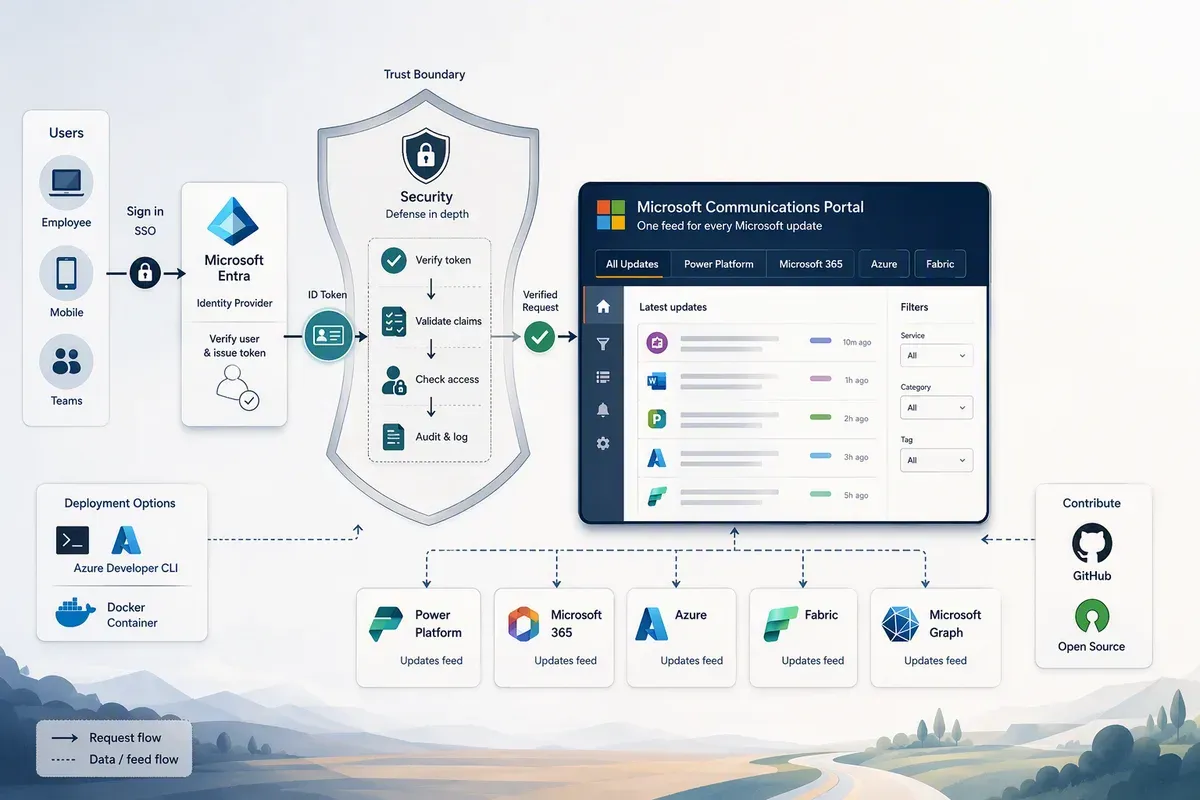
I lost count of how many browser tabs it takes to stay current on all the various streams of Microsoft updates. The Power Platform release plan in one tab. The Microsoft 365 Roadmap in another. Azure Updates, the Fabric roadmap, the Message Center, Service Health, each with its own layout, its own filters, and its own login. None of them talk to each other, so keeping a customer or a team briefed means bouncing between six portals and stitching the story together by hand.
I occasionally hear that frustration during customer conversations, so I built the Microsoft Communications Portal: a single, self-hosted dashboard that pulls all of those feeds into one filterable, dark-mode-friendly UI. It’s a sample/reference implementation, not an official Microsoft product, and it’s not supported by Microsoft Support. But it’s built with the kind of security hardening I’d want in place before putting anything in front of a tenant’s Message Center data.
What it is
The Microsoft Communications Portal is a small Node.js application with ten pages, each backed by a different upstream source:
| Page | What it shows | Backend |
|---|---|---|
| Home | Status cards for every configured data source | — |
| Power Platform Release Planner | Release features by product, wave, and date | releaseplans.microsoft.com (proxied) |
| Regional Release Plans | Feature availability by geography | releaseplans.microsoft.com (scraped and normalized) |
| Microsoft 365 Roadmap | Current and upcoming Microsoft 365 features | M365 Roadmap RSS |
| Azure Updates | Azure product announcements | Azure Updates RSS |
| Microsoft Fabric Roadmap | Release features across 14 product areas | roadmap.fabric.microsoft.com (proxied) |
| Microsoft 365 Message Center | Tenant-specific admin announcements | Microsoft Graph |
| Microsoft 365 Service Health | Current incidents and advisories | Microsoft Graph |
| Azure Service Health | Azure-level incidents for selected subscriptions | Azure Resource Manager (ARM) |
| Guided Report | A multi-source report wizard | — |
Seven of those ten pages need zero credentials. They’re reading public roadmap and RSS data, so you can have them running in under a minute. The other three (Message Center, Service Health, and Azure Service Health) need tenant-specific access, because they’re reading data that’s scoped to your organization.
Every page shares the same conveniences: a one-click Export that produces a self-contained HTML file you can paste straight into an Outlook email, a Generate Full Export modal for building a filtered report by date range and product, dark mode, and shareable URLs that preserve your filters. Seven of the feed pages also support optional AI summarization: a “Top 5 most impactful changes” digest and a per-item plain-language summary with an impact rating, audience, and admin-action flag.
How it works
Under the hood, server.js is a Node.js HTTP server with exactly one runtime
dependency (dotenv). Everything else, HTTP, HTTPS, crypto, gzip, static
file serving, runs on Node’s built-in modules. That’s a deliberate choice:
fewer third-party packages means a smaller supply-chain attack surface, and
it means the server works the same way on Node.js 24 LTS across Windows,
macOS, and Linux with no native add-ons to compile.
For the public pages, the server proxies and normalizes upstream RSS feeds
and the Power Platform and Fabric roadmap sites, caching results so repeat
page loads don’t hammer the upstream source. For the tenant-specific pages,
it authenticates to
Microsoft Graph using either a
client secret or, on Azure, a managed identity: an identity Azure
assigns directly to the hosting resource so there’s no secret to store or
rotate. Two Graph application permissions are needed:
ServiceMessage.Read.All for Message Center and ServiceHealth.Read.All
for Service Health, both of which require admin consent from a tenant
administrator. Azure Service Health reuses the same credential but also
needs the Azure Reader role assigned on the subscriptions you want to
monitor, because it calls the Azure Resource Manager REST API rather than
Graph.
If you turn on AI summarization, the server calls out to Azure OpenAI, OpenAI, or GitHub Models, whichever one you’ve configured, checked in that priority order. Without any provider configured, the AI panels are silently disabled and everything else keeps working.
Security features
The project’s SECURITY.md has the full policy and vulnerability reporting process, but a few design decisions in the README stood out to me as worth calling out specifically:
- The server refuses to run “fail-open.” Every deployment must resolve
to one of four explicit
AUTH_MODEvalues:easyauth(Azure App Service with Entra ID Easy Auth),reverse-proxy(behind an authenticating proxy, gated by a constant-time-compared bearer token),none-loopback-only(local development on127.0.0.1), orswa(linked behind Azure Static Web Apps). If the server can’t determine a safe mode, say by binding to a non-loopback address with noAUTH_MODEset, it callsprocess.exit(1)at startup instead of guessing. - Easy Auth validation is real validation, not header presence. The
server base64-decodes and JSON-parses the
X-MS-CLIENT-PRINCIPALheader, requiresauth_typ=aad, and cross-checks theoidclaim against the platform-injectedX-MS-CLIENT-PRINCIPAL-IDheader, plus a check that App Service itself reportsWEBSITE_AUTH_ENABLED=True. A spoofed header value doesn’t get you past the guard. - A single, shared HTML sanitizer. Feed and Graph API content is
untrusted by definition, since it comes from outside the server’s
control, so it’s parsed with
DOMParser, filtered through an allow-list of safe tags and attributes, and stripped of scripts, styles, iframes, inline event handlers, andjavascript:/data:URLs before it ever reaches the page. - Strict CSP with per-request nonces, no
unsafe-inline, plusframe-ancestors 'none',base-uri 'none', andobject-src 'none'. - SSRF protection on redirects. The RSS and release-plan fetchers only
follow redirects to
*.microsoft.comand*.azure.comover HTTPS, capped at five hops. - Prompt injection defenses on the AI features. The summarization and digest prompts explicitly instruct the model to treat feed content as data to analyze, not as instructions to follow. That’s a real concern once you’re feeding it arbitrary Microsoft feed text that a compromised upstream could manipulate.
- Per-IP rate limiting on every endpoint, with tighter limits on the billed AI routes (5/minute for summarize, 10/minute for the digest) and a configurable global daily LLM call budget so a misbehaving client can’t run up an API bill.
- Prototype pollution and path traversal guards, a 1 MB request body cap, HSTS, and an explicit CORS allow-list with no wildcard support.
None of this is opt-in configuration you have to remember to enable. It’s the default posture, and the server will tell you loudly at startup if something about your deployment doesn’t add up.
How to install and run it
The README lays out four deployment paths depending on what you’re trying to do:
Azure Developer CLI is the fastest path to a shared, always-on instance.
azd init --template russrimm/MicrosoftCommunicationsPortal followed by
azd up provisions an Azure App Service from the included Bicep templates,
and a post-provision script creates the Entra ID app registration and grants
the Graph permissions automatically. You’ll need both azd auth login and
az login before running it, plus Owner or User Access Administrator on the
subscription, since the Bicep template assigns the Reader role at
subscription scope, which Contributor access alone can’t do.
Azure Static Web Apps with a linked App Service backend layers Static
Web Apps’ global edge caching and built-in Entra ID sign-in in front of the
same server.js backend, useful if you want edge-cached static assets
without giving up the managed-identity-backed API.
Docker is the quickest way to kick the tires:
docker run -p 127.0.0.1:3000:3000 ghcr.io/russrimm/microsoftcommunicationsportal:latestThat binds to loopback only, so AUTH_MODE is auto-inferred and no
credentials are required for the seven public pages. Publishing on a
non-loopback interface requires you to explicitly set AUTH_MODE,
API_AUTH_TOKEN, and ALLOW_REMOTE_BIND=true, or the server will refuse to
start.
Running locally with Node.js is the path for anyone who wants to read or modify the code:
git clone https://github.com/russrimm/MicrosoftCommunicationsPortal.git
cd MicrosoftCommunicationsPortal
npm install
npm start
Open http://localhost:3000 and the seven public pages work immediately.
For Message Center and Service Health, either run
pwsh scripts/create-entra-app.ps1 to automate the app registration, or
follow the manual portal UI steps in the README to create it by hand and
drop the resulting client ID, secret, and tenant ID into a .env file.
Ways to contribute
The project is MIT-licensed and welcomes feedback and contributions. The README asks that you open an issue to discuss a change before submitting a pull request, so there’s alignment on approach before anyone spends time on code. Community conduct expectations are in the repo’s CODE_OF_CONDUCT.md.
If you want a project to poke at, a few things stand out as good starting
points from reading the code: the product-icon resolver in
static/product-icons.js
is a curated alias map plus fuzzy matching, and new Microsoft products get
added there regularly. The Feature Geography page is also missing its
checked-in screenshots, regenerable with
node scripts/capture-screenshots.js against a running local server. And
because the server has exactly one runtime dependency by design, any pull
request that adds a new one should have a good reason for it.
If you’d rather just use it: clone it, point it at your tenant, and see whether one dashboard actually saves you the six-tab shuffle. I’d like to know either way. Open an issue on the repo, or reach out directly if you’d rather talk it through first.
Get the latest learnings
Occasional notes on Azure, AI, and cloud architecture. No spam, unsubscribe anytime.
Related articles
See Every CSP Violation in Your Power Platform Apps
Power Platform sends CSP violation reports from code, model-driven, and canvas apps. Here's the small open source collector I built to triage them.
Portal of Portals: One Console for Every Admin Portal
A tour of Portal 360°: multi-tenant admin, config drift, CVE tracking, and the BFF-secured Next.js architecture behind one Microsoft cloud console.
InfiniAIBook: A Self-Hosted AI Research Notebook
A field guide to InfiniAIBook, the AI research notebook you host yourself: cited chat, live voice discussions, Studio formats, videos, and Azure deployment.
Comments
Comments are hosted by GitHub Discussions. Loading them connects your browser to giscus.app and GitHub.