The Power Platform API Grew Up. Here's What That Looks Like in Production
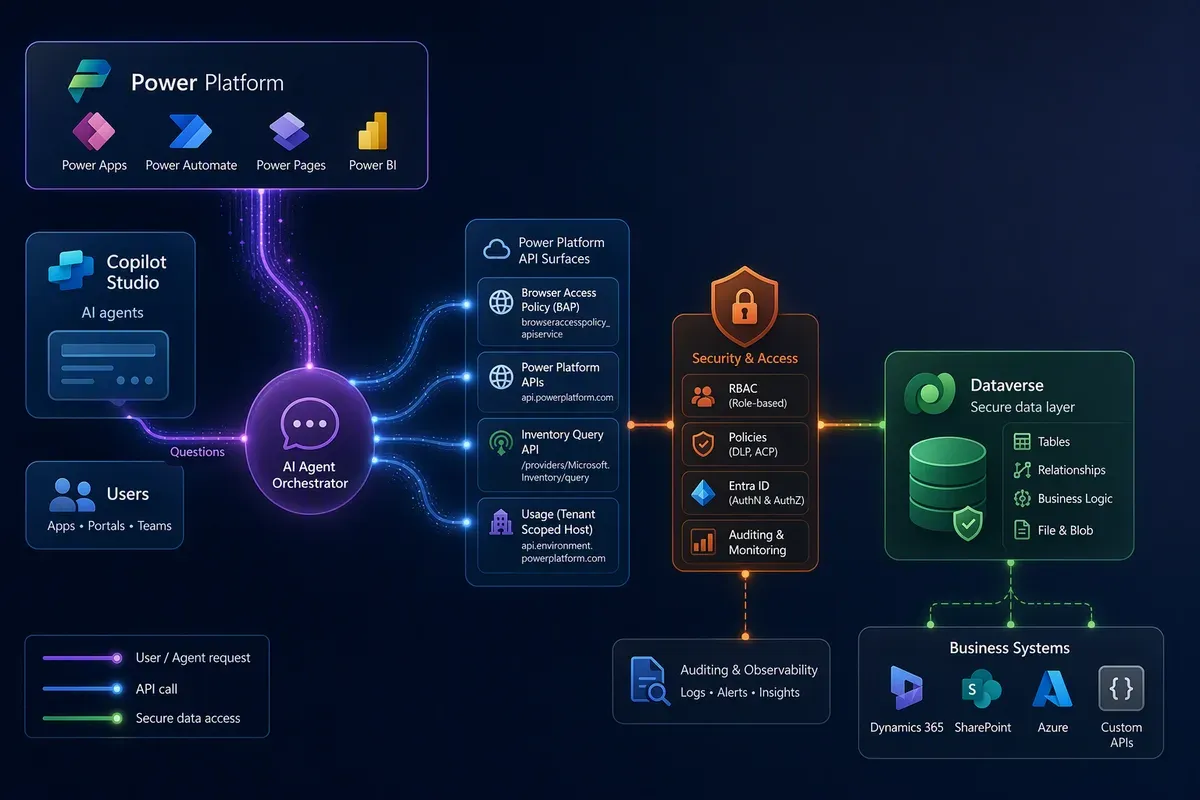
Credit where it’s due first: the Power Platform product group shipped
api.powerplatform.com, and the rest of this post is basically a long way of
saying it was worth doing. I’m glad it exists, and I’m genuinely curious to see
where it goes from here.
The first time I called a Power Platform admin API, it was api.bap.microsoft.com,
it only understood one audience, and getting a service principal past its front
door meant running a PowerShell cmdlet to register it as an “admin management
app” first. There was no role-based access. There was no unified query surface.
Copilot Studio — Power Virtual Agents, at the time — wasn’t reachable from that
API at all; it lived entirely in Dataverse tables you had to already know about.
I’m building Portal 360°, a single
console that consolidates the Microsoft admin surfaces I touch every day, and
Power Platform is one of its biggest sections. This post is a technical tour of
that section, screen by screen, with the exact endpoint behind each one — BAP,
api.powerplatform.com, the Dataverse Web API, and a tenant-scoped usage host
I didn’t even know existed until I started building this. Every call shown
below is real (trimmed and sanitized) code from that codebase.
Two hosts, one platform
The legacy surface — informally called “BAP” after its
Microsoft.BusinessAppPlatform resource-provider segment — predates any concept
of scoped access. A service principal calling it isn’t granted a role; it’s
registered wholesale as an “admin management app” via
New-PowerAppManagementApp, and from that point on it can see and touch every
environment in the tenant:
// Delegated audience: https://service.powerapps.com
// App-only audience:  https://api.bap.microsoft.com
export async function getBAPClientCredentialsToken(): Promise<string> {
  const tokenRes = await fetch(
    `https://login.microsoftonline.com/${process.env.AZURE_TENANT_ID}/oauth2/v2.0/token`,
    {
      method: "POST",
      headers: { "Content-Type": "application/x-www-form-urlencoded" },
      body: new URLSearchParams({
        client_id: process.env.AZURE_CLIENT_ID!,
        client_secret: process.env.AZURE_CLIENT_SECRET!,
        scope: "https://api.bap.microsoft.com/.default",
        grant_type: "client_credentials",
      }),
    }
  );
  const { access_token } = await tokenRes.json();
  return access_token;
}
api.powerplatform.com — the Power Platform API — is the newer, RBAC-based
gateway that’s meant to replace it over time. In 2025 the product team
described the move as a strategy shift, not just a new host name. From the
Power Platform team’s own write-up:
“We’re transforming Power Platform into an API-first ecosystem — where every feature in [the admin center] is backed by a well-documented, publicly accessible API.” The goals: centralized audit logging integrated with Microsoft Purview, granular role-based access control, and SDK parity across C#, TypeScript, and Python via Kiota-generated clients.
The RBAC piece is the part that actually changes how you build against it. The Authorization API (currently in preview) lets you assign one of four built-in roles — Power Platform owner, contributor, reader, or RBAC administrator — to a user, group, or service principal, scoped to one environment, an environment group, or the whole tenant:
POST https://api.powerplatform.com/authorization/roleAssignments?api-version=2024-10-01
Content-Type: application/json

{
  "roleDefinitionId": "ff954d61-a89a-4fbe-ace9-01c367b89f87",
  "principalObjectId": "<enterprise-app-object-id>",
  "principalType": "ApplicationUser",
  "scope": "/tenants/<tenant-id>"
}
Compare that to New-PowerAppManagementApp with no scope argument at all. What
follows is what those two hosts — plus Dataverse, plus a third host neither of
them owns — actually look like once you’re calling them from a real console.
Environments: capacity and add-ons are still BAP’s job
Every column here — type, managed-environment badge, database size — comes
from one BAP call, expanded with $expand=properties.capacity and
properties.linkedEnvironmentMetadata. There is a newer environment-listing
endpoint on api.powerplatform.com —
List Environments For User,
still marked preview — and it does return type, state, and
protectionLevel. But its EnvironmentResponse shape has no capacity,
add-on, or linkedEnvironmentMetadata fields, so the database-size and
add-on columns on this page still have to come from BAP’s $expand. That’s
the piece of BAP’s job api.powerplatform.com hasn’t taken over yet.
Governance: three different sources, reconciled on one page
This page literally prints its own data lineage in the UI: every environment’s Advanced Connector Policy (ACP) and Data Loss Prevention (DLP) policies, resolved from two different hosts and joined by environment ID. That split is worth unpacking, because it’s a good example of “old and new coexisting” rather than one clean migration:
Advanced Connector Policies are the newer model: a rule-based policy holding a
ConnectorManagement rule set, with three buckets — business, non-business,
blocked — served entirely from api.powerplatform.com.
Classic DLP policies — the ones admins have used for years — are still served
from api.bap.microsoft.com, under a PowerPlatform.Governance provider
namespace that, confusingly, has nothing to do with the new governance/
routes on api.powerplatform.com. Same word, two different hosts, two
different data models. If you’re building against both, that naming collision
is the first thing that will trip you up.
Tenant settings: one POST, one enormous payload
listtenantsettings hasn’t moved off BAP, and it’s still the single widest
call in the whole surface: one POST returns every governance, licensing,
Power Apps, Power Automate, and AI toggle in the tenant as one JSON object.
Microsoft adds fields to it several times a year, which is exactly why Portal
360° runs a scheduled job that diffs its own settings registry against the
Terraform provider’s tenant_settings schema
and opens a pull request when they drift — learn.microsoft.com tends to catch
up to new fields later than that provider does.
Apps: one query, not one loop per environment
This is where api.powerplatform.com earns its keep. Before the inventory /
resource query endpoint existed, listing every app across every environment
meant looping environments and calling a separate endpoint per resource type.
Now it’s one query, with a type filter that decides what comes back:
// src/lib/power-platform-inventory-api.ts
export const INVENTORY_API_BASE = "https://api.powerplatform.com";
export const INVENTORY_API_VERSION = "2024-10-01";

export const INVENTORY_QUERY_URL =
  `${INVENTORY_API_BASE}/resourcequery/resources/query?api-version=${INVENTORY_API_VERSION}` as const;
POST https://api.powerplatform.com/resourcequery/resources/query?api-version=2024-10-01
Content-Type: application/json
{
"TableName": "PowerPlatformResources",
"Clauses": [
{
"$type": "where",
"FieldName": "type",
"Operator": "==",
"Values": ["'microsoft.powerapps/canvasapps'"]
},
{
"$type": "project",
"FieldList": [
"name",
"properties.displayName",
"properties.environmentId",
"properties.createdAt",
"properties.ownerId"
]
}
]
}The body isn’t a raw KQL string — it’s a TableName plus an ordered array of
Clauses, each one a small JSON object the API translates into a KQL operator
before handing the whole thing to Azure Resource Graph. The two clauses above
become one where and one project:
PowerPlatformResources
| where type == 'microsoft.powerapps/canvasapps'
| project name, properties.displayName, properties.environmentId, properties.createdAt, properties.ownerId
Swap the type value in that first clause and the same endpoint hands back
model-driven apps, cloud flows — or, as you’ll see below, Copilot Studio
agents.
The same table, no Power Platform API in between
PowerPlatformResources isn’t exclusive to api.powerplatform.com. It’s an
Azure Resource Graph
table, so anything that already speaks Resource Graph — Resource Graph
Explorer in the Azure portal, az graph query, the Az.ResourceGraph
PowerShell module, or the Resource Graph REST API — can query it directly,
authenticated the normal Azure way, with no Power Platform-specific client or
request shape to learn:
az graph query -q "PowerPlatformResources | where type == 'microsoft.powerapps/canvasapps' | project name, properties.displayName, properties.environmentId, properties.createdAt | order by properties.createdAt desc"Same rows, same schema, two front doors. api.powerplatform.com is the
better fit when a service that already authenticates as a Power Platform
service principal needs a stable, versioned, tenant-scoped endpoint. Resource
Graph is the better fit when you’re already living in Azure tooling and want
to run a query without standing up a separate call — it’s also how the Power
Platform admin center’s own inventory grid gets its data under the hood.
Microsoft’s Power Platform inventory
documentation lists both paths, plus the Power Platform for Admins V2
connector, as first-class ways to reach the same data.
Automation: the same governance an admin console does, as a low-code flow
This cloud flow does something a Portal 360° API route could also do over REST: it walks environments on a recurrence trigger and quarantines Copilot Studio agents that trip a governance rule, using the Power Platform for Admins V2 connector alongside Dataverse and Office 365 Users. That connector is the low-code face of the same API-first push — it’s Kiota-generated from the same OpenAPI description as the C# and Python SDKs, so a citizen developer building a flow and a service calling the REST API directly are ultimately hitting the same contract.
Copilot Studio: no longer a separate universe
Building an agent programmatically means writing directly to Dataverse’s
bots table, then adding botcomponents rows for the language-model
configuration and each topic — there’s no api.powerplatform.com endpoint for
agent authoring:
// src/app/api/power-platform/copilot-studio/create-agent/route.ts (trimmed)
const body = {
  name: cfg.displayName.substring(0, 100),
  schemaname: toBotSchemaName(prefix, cfg.displayName),
  language: lcid,
  authenticationmode: 2, // Integrated (authenticate with Microsoft)
  runtimeprovider: 0,    // Power Virtual Agents
  configuration: JSON.stringify({
    $kind: "BotConfiguration",
    defaultLocale: cfg.language,
    settings: { GenerativeActionsEnabled: cfg.enableGenerativeAnswers },
  }),
};
const result = await dataverseRequest(instanceUrl, token, "bots", "POST", body);That’s a design-time view, not a usage view: it shows what an agent is wired to, with no timestamps at all. It’s exactly the join Portal 360°‘s own docs warn against over-trusting — a connector listed here could have fired ten thousand times or never once.
This is the detail worth sitting with. Copilot Studio agents used to be
reachable only through Dataverse — the bots table, plus whatever transcript
JSON you were willing to parse yourself. Today, the same resourcequery call
that lists a tenant’s canvas apps also lists its Copilot Studio agents, with
orchestration mode, auth mode, and channel data right there in the payload.
Governance stopped being a Copilot-Studio-shaped exception and became one more
row type in the platform’s own inventory.
That’s the honest seam: agent governance and inventory live on the Power Platform API now; agent content and conversation history still live in Dataverse, because a Copilot Studio agent is a Dataverse record under the hood. The API grew a front door for the tenant-wide questions — which agents exist, who owns them, are they quarantined — without needing to reinvent Dataverse for the questions that were already Dataverse’s job.
Licensing and capacity: two APIs that don’t quite agree
These two pages can — and do — disagree slightly for the same tenant on the same day, and that’s normal rather than a bug. The Tenant Capacity API reports Microsoft’s licensing system’s view: what you’re allocated and billed for, updated on a daily cycle. The Dataverse Storage page sums real-time, per-environment consumption straight off BAP’s environments call. Neither number is wrong; they’re two systems of record that sync periodically, not continuously, and the migration from one to the other is still visibly a work in progress rather than a finished cutover.
Usage: a third host neither BAP nor api.powerplatform.com owns
This one surprised me. Adoption trends for Power Apps, Power Automate, and
Copilot Studio don’t come from api.powerplatform.com or from BAP — they come
from a tenant-scoped host derived from the Entra tenant ID, of the shape
https://{tenant-host}/usage/{Dataset}(from=...,to=...)?api-version=1, authenticated
with a delegated token for the api.powerplatform.com audience even though the
host itself is different. It’s the exact endpoint the Power Platform admin
center’s own Usage pages call — Portal 360° just calls it directly instead of
going through the UI. PowerAppsUsage, PowerAutomateUsage, and
CopilotStudioUsage are the per-resource summary datasets; append
TimeSeries for the trend line.
Recommendations: the Advisor API, still in preview
Advisor-style recommendations — “enable sharing limits on this canvas app,”
“enable Global Secure Access for agents” — come from the Power Platform API’s
analytics/advisorRecommendations endpoint. The api-version Portal 360° calls
today (2022-03-01-preview) is older than the one Microsoft Learn currently
documents (2024-10-01) for the same route, which is a small, honest reminder
that pinning an api-version means someone has to go back and bump it —
nothing about “API-first” makes that maintenance optional.
Known issues: not a Power Platform API at all
Worth naming precisely because it’s the one page in this tour that isn’t Power Platform API-shaped: it’s Microsoft Graph’s service-communications data, filtered client-side to service names like “power apps” and “power automate.” It sits in the Power Platform section of Portal 360° because that’s where an admin looks for it, not because Power Platform owns the data behind it.
What “growing up” adds up to
None of this makes Portal 360° a Microsoft product — it’s an independent,
unaffiliated project I build in my own time, and for anything compliance-
critical you should still reach for the official admin center. But as a stress
test, it’s a decent one: an API that started as one host, one audience, and a
PowerShell registration step now backs a console where environment capacity
and add-on data still come from BAP, apps and Copilot Studio agents come from
one shared query endpoint,
RBAC replaces an all-or-nothing trust model, and a handful of surfaces —
Dataverse, a tenant-scoped usage host, Microsoft Graph — still do the jobs
api.powerplatform.com hasn’t reached yet. The clearest evidence it’s still
moving is the pace of the
monthly changelog
itself: a single recent month added environment failback and reset endpoints,
tenant-wide license-consumption-by-user reporting, and Power Pages web
application firewall policy management, alongside routine SDK releases for the
C# and Python packages and the Power Platform for Admins V2 connector. That’s
the distance it’s covered, and it isn’t done covering ground.
Last verified: August 2026, against the Power Platform API reference on Microsoft Learn, the RBAC role-assignment tutorial, and Portal 360°‘s own Power Platform integration code.
Get the latest learnings
Occasional notes on Azure, AI, and cloud architecture. No spam, unsubscribe anytime.
Related articles
Six Business Apps in One Sunday with Copilot Studio's Copilot Managed Runtime App Studio
I had an agent build six demo apps in Copilot Studio in one day, then wire one to live energy data through custom connectors. Here's what review taught me.
Sync ALL your Copilot Studio conversation transcripts to a single location
Compare Copilot Studio transcript replication through Fabric and Azure Functions, with practical guidance on retention, identity, parsing, and Power BI costs.
An Hour with Azure SRE Agent
What Azure SRE Agent is, what setup actually looks like, and what happened when I pointed it at my own repo, my Application Insights telemetry across Dataverse, Copilot Studio, and Foundry, and then asked it for a health check on everything at once. Plus what connecting an incident platform buys you — autonomous mitigation, a verification loop, and a handoff straight to the GitHub Copilot coding agent — the five switches worth flipping that you don't get turned on by default, and what the newly published Zero Ops framework recommends, including the two governance layers above per-tool Allow and Ask and three details worth verifying against the current docs.
Comments
Comments are hosted by GitHub Discussions. Loading them connects your browser to giscus.app and GitHub.