Sync ALL your Copilot Studio conversation transcripts to a single location
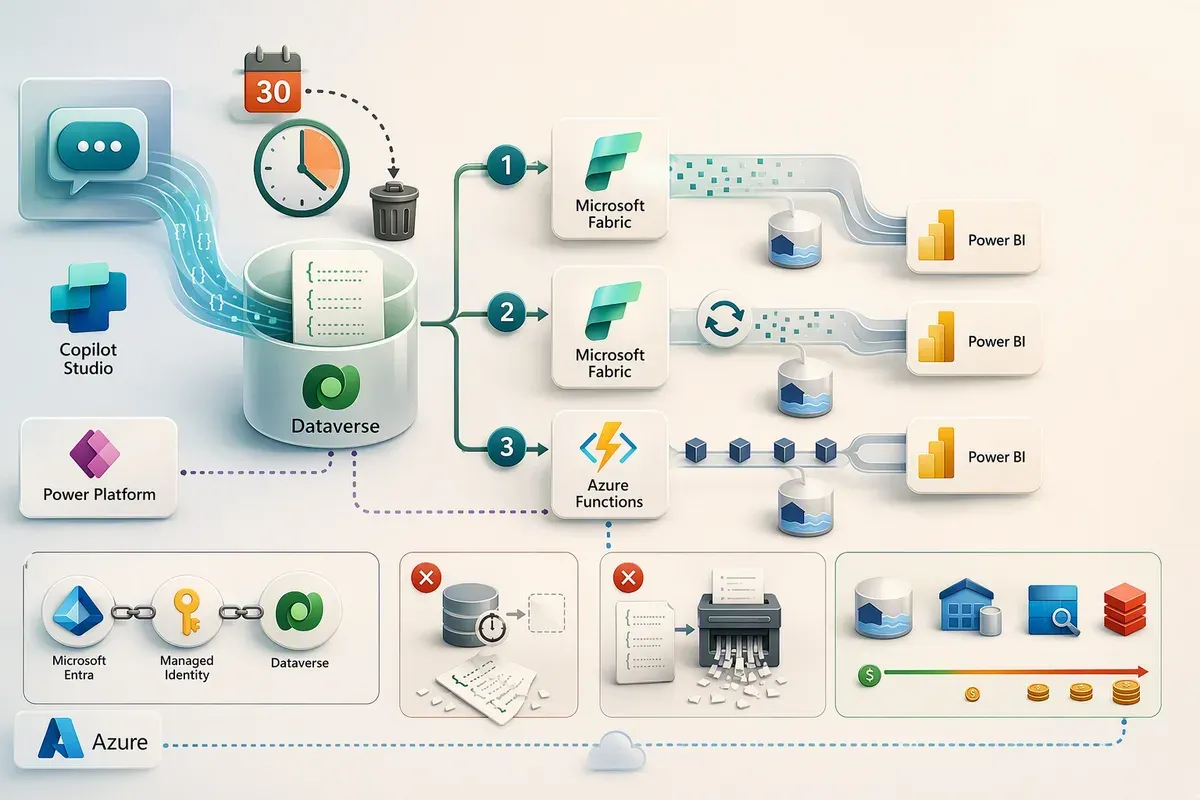
If you want one report across Copilot Studio agents in multiple environments, you need a way to bring their conversation history together.
For a year of reporting, decide how to keep that history before building the report. You can extend approved source retention, maintain a separate archive, or retain only the aggregates your reporting needs.
This post compares two Link to Microsoft Fabric sync engines and a custom Azure Functions collector. They are three configurations, not three separate products or an exhaustive list of export methods.
Documentation reviewed September 9, 2026. Design recommendations below are not deployment benchmarks or price quotes.
The short version
Start with what you already operate. If you have suitable Fabric capacity, evaluate Link to Fabric first. If you don’t, compare a small collector with managed export alternatives before buying capacity just for transcripts.
That question narrows the options; it doesn’t settle retention, permissions, table eligibility, or ownership.
For a weekly report, sync latency may be less important than a reliable refresh. Low volume can reduce storage and processing costs, but it doesn’t remove request limits, licensing requirements, or the work of operating a pipeline.
What matters about Copilot Studio transcripts
Copilot Studio can save agent conversations in the Dataverse
conversationtranscript table. Its Content column contains a JavaScript Object
Notation (“JSON”) activity log, and a default bulk-delete job removes transcripts
older than 30 days.
The transcript documentation establishes several rules that affect every option.
Check that transcripts exist. Microsoft lists Dataverse for Teams environments and Microsoft 365 Copilot agents as exclusions, and also states that transcripts aren’t stored for agents deployed in developer environments. Administrators can disable Dataverse transcript saving. Confirm the environment, agent type, and recording policy before choosing a transport.
A conversation can span several rows. The Content column has a 1 megabyte
(“MB”) limit per record. Larger transcripts share Name and
ConversationStartTime across records, with different Metadata.BatchId values.
Group on both fields and sort by BatchId to reassemble them. Include the source
environment in those keys when combining environments.
Source availability and replication delay are separate. The system normally
saves a record after 30 minutes of conversation inactivity. The Telephony channel
has a documented three-minute timeout after an End Conversation event. If a
conversation resumes after inactivity, new activities get a new
ConversationStartTime. Faster polling can’t retrieve a record before it exists,
but it can shorten the wait after Dataverse writes it.
Thirty days is a default, not a fixed platform limit. Microsoft documents canceling Bulk Delete Conversation Transcript Records Older Than 1 Month and creating a replacement job. Change that policy only with retention approval and a Dataverse capacity budget. This is separate from Copilot Studio’s own storage, which retains transcript data for up to 28 days.
The content needs parsing and protection. Transcripts can include messages, events, variable values, and knowledge-source content. Moving the table doesn’t turn it into a reporting model. Nor does the Bot Transcript Viewer role grant or restrict access to the exported copy: configure destination and report permissions explicitly.
Option 1: Link to Fabric with the previous sync engine
Link to Fabric creates a lakehouse with shortcuts to an optimized Dataverse replica. The previous engine uses an intermediate comma-separated values (“CSV”) step before conversion to Delta Parquet. Microsoft operates the replication service; you still own the transformations, report, permissions, and monitoring.
An existing link can be a reasonable fit for a report that tolerates its measured freshness. You don’t need to rebuild a working connection solely for lower latency.
For either engine, setup requires Dataverse System Administrator and workspace administrator permissions, suitable capacity in the supported geography, and the relevant Fabric tenant settings. Power BI Premium Per User alone is not Fabric capacity. The licensing guide distinguishes per-user licenses from capacity.
Microsoft recommends workspace identity for the Fabric connection. Its documented setup assigns System Administrator to that identity’s Dataverse application user. Review that access with the environment owner; a managed service still needs a permission review.
Check that conversationtranscript is available for selection with Track
changes enabled. Review the whole table selection, not just transcripts:
some system and add-in tables
are included automatically and can’t be removed.
The replica also consumes additional Dataverse storage. It isn’t simply free OneLake storage attached to a capacity you already own. Microsoft describes that accounting in the Link to Fabric overview.
Option 2: Link to Fabric with low-latency sync
Low-latency sync writes directly to Delta Parquet. The current setup documentation says it rolls out by station, is enabled automatically, and requires no separate opt-in for new links once available. Look for Low-latency mode on the link in the Link data list.
Existing links stay on the previous engine until you unlink and relink. Treat that as a migration: unlinking removes the generated lakehouse and its shortcuts, and relinking performs a full initial sync. Inventory dependent reports and pipelines, preserve any separately retained history, and plan the reconnection before unlinking.
There are two compatibility details worth checking. The new engine writes
timestamps as INT64, rather than the previous INT96 format. Microsoft also
documents that relinked shortcuts currently show live data only when Dataverse
long-term retention is in use; retained data remains stored, but its visibility
through those shortcuts changes. If your report depends on that retained-data
view, keep the current link until you have a supported reporting path.
Don’t budget around a universal two-minute delay. Microsoft’s latency guidance reports workload-specific observations, not a service-level agreement (“SLA”). Measure transcript availability through to the finished report.
Leave Change Data Feed off unless a downstream process needs row-level changes. When enabled, it retains approximately 24 hours of changes and adds compute and memory work. It can help feed an archive, but it isn’t itself a long-term archive.
For a new link with suitable capacity and approved data access, this is the managed path I’d evaluate first. You still need a history strategy: copying rows into a separately retained table before source deletion is one approach. A live shortcut alone isn’t a durable archive.
Option 3: Azure Functions on a timer
A custom collector is useful when you need transformation before destination storage, selective extraction, or an archive outside Fabric. It reads through the Dataverse Web API. You own its code and operations, so compare that responsibility with any infrastructure savings.
You can find my collector in the russrimm/copilot-transcript-sync GitHub repository. It syncs Copilot Studio conversation transcripts across Power Platform environments into a single Azure Data Explorer database, using workload identity federation instead of stored secrets. Start with the repository’s setup instructions, then review environment access and retention for your deployment.
A 30-minute timer is a reasonable starting schedule for a relaxed reporting requirement, not a requirement imposed by transcript timing. Include retries, paging, and an authorized backfill procedure. A separate web endpoint isn’t mandatory: Azure Functions supports manual invocation of timer functions.
Start with a read-only runtime identity
A user-assigned managed identity can be registered directly as a Dataverse application user. Microsoft’s application-user instructions explicitly accept a managed identity’s Application ID. A separate federated Microsoft Entra ID app registration is an alternative, not a prerequisite.
Give the runtime identity a custom role with the necessary read access to the transcript table and any agent metadata tables it queries. Cross-environment reporting requires onboarding in each approved environment; discovering an environment doesn’t grant access to it.
Keep privileged onboarding separate from collection. The legacy
addAppUser endpoint,
documented as preview, always assigns System Administrator. That isn’t a reason
to give a collector tenant-wide administrator permissions: the
Power Platform CLI (aka pac cli)
supports assigning application users with a specified role.
Choose an incremental strategy deliberately
Dataverse change tracking can support an archive. It reports deletions; it doesn’t force your custom consumer to delete its stored copy. Decide how routine source expiry differs from an approved privacy deletion, and implement both policies.
Change-tracking requests disallow $filter, $orderby, $top, and $expand,
but still support paging. Design for the configured change-retention window,
which defaults to seven days, and a recovery procedure if the saved token
becomes too old.
A timestamp watermark is another option for an append-oriented export. I’d design that path as follows:
- Keep a committed extraction checkpoint per environment. Query a bounded
createdonwindow with deliberate overlap, not a window based onConversationStartTime. - Follow every continuation page and make destination writes idempotent, so replaying a run doesn’t create duplicate logical records. Key records by source environment and transcript row ID.
- Advance the checkpoint only after the entire window is durably stored. Prevent concurrent backfills and scheduled runs from racing that checkpoint.
- Reconcile against source records still within retention. A
createdonscan won’t discover later changes to old rows; use change tracking or an appropriate update scan if those changes matter.
An overlap reduces boundary misses; it doesn’t guarantee recovery from an arbitrarily delayed record. Neither strategy can recover a transcript deleted before the collector captured it.
Parse the documented fields, and surface exceptions
Build a small set of representative transcripts before writing the parser. Include long conversations, test-pane sessions, and every channel you report on. Treat undocumented payload variations as cases to validate, not universal product behavior.
| Field or behavior | Reporting guidance |
|---|---|
from.role | The transcript documentation defines 0 as agent and 1 as user. Don’t substitute a different activity schema’s role convention. |
timestamp | Documented as epoch seconds. Validate units and plausible dates; don’t silently guess another encoding. |
Name and Metadata | Preserve these fields. Use the documented agent relationship for joins rather than assuming IDs from different fields are interchangeable. |
from.id | The system hashes it. It supports distinct-user counts only when the channel supplies a stable user identifier; otherwise it can identify a conversation. Don’t assume it resolves to a person. |
ConversationInfo.isDesignMode | Separate test-pane traffic from production adoption metrics. |
| SharePoint knowledge responses | Microsoft documents the answer as REDACTED; the question and source-document content in search_results can still be present. |
Reassemble split records before deriving conversation metrics, and recompute those metrics when another batch arrives. Don’t equate transcript row count with conversation count. Count parsing failures explicitly; if you quarantine failed payloads, apply the same access and retention controls as the archive.
Before writing all the aggregation logic yourself, evaluate the Copilot Agent Kit for conversation key performance indicators (“KPIs”). Its Conversation KPIs feature parses transcripts into Dataverse aggregates and includes sample Power BI reports. You must configure each agent in the kit before it can sync that agent’s conversation telemetry. For each agent, select Conversation KPIs in its Agent Configuration record and supply its Dataverse URL and Agent ID. Review the kit’s deployment, storage, and support requirements against your needs; custom parsing isn’t the only route.
Store only what you’re allowed to keep
Decide permissions and retention before the first write. If policy requires redaction before export storage, transform in memory and keep unredacted content out of logs, staging files, and failure records too. Retain an untouched source copy for reprocessing only when policy explicitly permits it.
Separate diagnostic telemetry from transcript text. Track successful completion and the committed checkpoint per environment, even when a run finds zero rows. Alert on failures, overdue successful runs, and replication lag. An absence of new conversations can be normal; it isn’t sufficient evidence of a failed timer.
The destination and operating model decide the cost
For sizing, 2,000 conversations a day at an assumed 30KB each is about 1.8GB per 30-day month and 21.9 GB per 365-day year, using decimal units. That’s raw payload arithmetic, not a storage bill or a Power BI model-size estimate. Parsed tables, indexes, replicas, logs, and retention add their own footprint.
| Approach | Include in the estimate |
|---|---|
| Link on existing Fabric capacity | Available compute headroom, additional Dataverse replica storage, separately retained Fabric data, transformations, and reporting licenses. |
| Buy Fabric capacity for this workload | Regional capacity pricing and active hours, storage, report consumption, and the operational work that remains. |
| Function into Blob or Azure Data Lake Storage (“ADLS”) | Executions, host and archive storage, transactions, transformations, logs, networking, and Power BI connectivity and licenses. |
| Function into a database or analytics service | All collector costs plus that destination’s compute, storage, ingestion, and query charges. Azure SQL, Azure Data Explorer, and Fabric Eventhouse have different billing models. |
For a cost-sensitive collector, start by estimating Blob or ADLS with curated reporting files. A database or analytics service may earn its cost through querying and operational features, but don’t assume it has the same price as object storage.
Azure Functions Flex Consumption supports virtual network integration. Private endpoints and data processing still have costs. The endpoints you need depend on the storage services and bindings you actually use, rather than a fixed count for every Function app.
Include the report’s network path too. A private-only storage account isn’t automatically reachable by Power BI’s cloud refresh service; validate a supported gateway or connection arrangement and include its licensing and hosting costs. Don’t reopen public access just to make refresh succeed.
Power BI Pro supports up to eight scheduled refreshes per day. Check the model-size limit as well as refresh duration: a year of raw transcripts may not fit even if the source workload feels small. For ordinary Power BI sharing on Fabric capacities smaller than F64, viewers need Pro or Premium Per User licenses.
Use the Azure pricing calculator and your organization’s agreement for the actual configuration. Neither “existing capacity means zero incremental cost” nor “the custom path costs under $120 a year” is a safe general estimate.
Two alternatives before you build
For a small report within approved source retention, the
Power Query Dataverse connector
may be enough. It supports Import and DirectQuery and requires the Tabular Data
Stream (“TDS”) endpoint and appropriate read permissions. Test Content retrieval
and JSON parsing with representative records; the connector has query timeouts
and isn’t the recommended bulk-extraction path.
An import refresh isn’t an archive policy. Incremental refresh can retain historical partitions, but a rebuild against a purged source cannot reconstruct those records. Keep an independent durable copy if recovery of that history is a requirement.
Also evaluate Azure Synapse Link append-only export. In that CSV mode, source deletes append deletion markers rather than removing previously exported rows. It still needs downstream processing and a retention policy, and batching means it isn’t a complete audit log of every intermediate change. It does show why long-term history alone doesn’t force a custom Function.
Before you decide
Take these questions to the environment owner and the reporting owner together:
- Are transcripts being saved, and is this table eligible for the proposed link?
- Do you need conversation text for a year, or would retained aggregates meet the reporting requirement?
- What retention and privacy-deletion rules apply to the source, archive, diagnostics, and Power BI model?
- Can existing Fabric capacity, Dataverse storage entitlement, and Power BI licensing support the workload?
- Does the report meet its freshness target from conversation completion through to refresh, including quiet periods and failed runs?
- Who owns access reviews, parser changes, recovery, and environment onboarding?
I’d pilot the managed link first where the capacity and governance fit. Where they don’t, compare an approved managed export with a read-only collector. Whichever path you choose, prove that an authorized test transcript remains reportable after source expiry and can still be deleted under the archive’s own policy.
Get the latest learnings
Occasional notes on Azure, AI, and cloud architecture. No spam, unsubscribe anytime.
Related articles
Six Business Apps in One Sunday with Copilot Studio's Copilot Managed Runtime App Studio
I had an agent build six demo apps in Copilot Studio in one day, then wire one to live energy data through custom connectors. Here's what review taught me.
The Power Platform API Grew Up. Here's What That Looks Like in Production
A technical tour of every Power Platform and Copilot Studio API surface behind Portal 360° — BAP, api.powerplatform.com, RBAC, the inventory query endpoint, Dataverse, and the tenant-scoped usage host — with real, sanitized calls and screenshots.
An Hour with Azure SRE Agent
What Azure SRE Agent is, what setup actually looks like, and what happened when I pointed it at my own repo, my Application Insights telemetry across Dataverse, Copilot Studio, and Foundry, and then asked it for a health check on everything at once. Plus what connecting an incident platform buys you — autonomous mitigation, a verification loop, and a handoff straight to the GitHub Copilot coding agent — the five switches worth flipping that you don't get turned on by default, and what the newly published Zero Ops framework recommends, including the two governance layers above per-tool Allow and Ask and three details worth verifying against the current docs.
Comments
Comments are hosted by GitHub Discussions. Loading them connects your browser to giscus.app and GitHub.